
Introduction
For some people, fast isn’t fast enough. They aren’t content unless they’re at the bleeding edge of gadget speed. Maybe waiting more than 3 seconds for an application to launch kicks in their ADHD. For whatever reason to need the speed, OCZ’s new SSD is looking to be the drive to replace your SSD. Here we have the OCZ RevoDrive. The RevoDrive actually combines two SSDs in a RAID 0 and probably doesn’t look like any hard drive you’ve seen before. To reach SSD shattering speeds, the RevoDrive uses your PCI-E x4 slot, forgoing the standard SATA interface. It’s as if the host of Pimp My Ride walked into OCZ’s R&D department and said, “Yo dawg, I heard you like SSD’s, so I got you an SSD for your SSD. Instead of that slow-ass SATA 6G, we’re gonna roll in your PCI-E slot too.”
By now you’ve probably figured that the drive is fast, but just how fast? Does all this speed mean you’re going to have to take a second mortgage to get it? You’ll just have to read on to find out.

Manufacturer Overview
Focusing on both performance and affordability for consumers, the RevoDrive PCI-Express SSD is designed to accommodate a wide range of computing environments beyond everyday use to video-editing and other multi-media creation and management applications.
Moving beyond the bottleneck of SATA II, the RevoDrive features a PCI-E interface to deliver superior speeds up to 540MB/s reads and random 4k writes up to 75,000 IOPS. Designed for high-performance gaming PCs and workstations, the RevoDrive has the unique capability to run both Windows and your essential applications and games to not only provides a more responsive PC experience, but promote a cooler, quieter, and more energy efficient conditions compared to traditional mechanical hard drives.
RevoDrive is available in 50GB up to 480GB capacities to offer extensive space for the latest operating systems, game titles, and applications for snappier boot and load times. The RevoDrive series comes backed with a 3-year warranty and ultra-reliable 2 million hour mean time between failure (MTBF) rating.
Specifications
- Available in 50GB to 480GB capacities
- PCI-Express interface (x4)
- For use as primary boot drive or data storage
- Internal RAID 0
- 181.07 (L) x 21.59 (W) x 125.08mm (H)
- Shock Resistance: 1500g
- Seek Time: 0.1 ms
- Operating Temp: 0°C ~ +70°C
- Storage Temp: -45°C ~ +85°C
- Power Consumption: 3W Idle, 8W active
- MTBF: 2,000,000 hours
- 3-Year Warranty
- Compatible with Windows XP 32/64, Vista 32/64, Windows 7 32/64
50-80GB Max Performance
- Read: Up to 540 MB/s
- Write: Up to 450 MB/s
- Sustained Write: Up to 350 MB/s
- Random Write 4KB (Aligned): 70,000 IOPS
120GB-480GB Max Performance
- Read: Up to 540 MB/s
- Write: Up to 480 MB/s
- Sustained Write: Up to 400 MB/s
- Random Write 4KB (Aligned): 75,000 IOPS
The read and write performance that the drive claims is faster than any other single drive that we have reviewed. Posted specs don’t always tell the whole truth though. That’s what we have benchmarks for, but first a closer look.
Packaging
 |
 |
Inside the box for the RevoDrive you will find….. another box. Inside of that is where the goodies lie.
 |
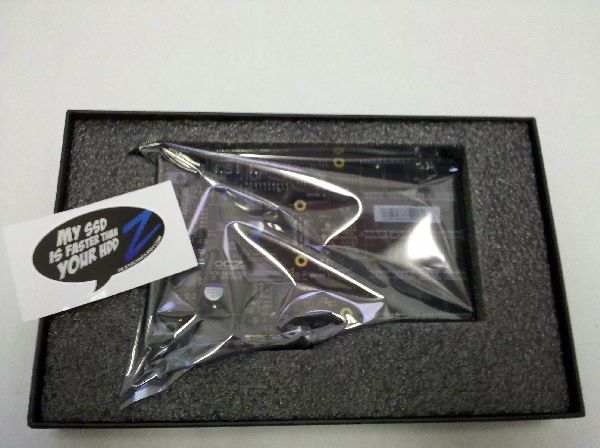 |
The drive itself is fully encased in foam padding, making it very difficult to damage in transit. OCZ includes a nice sticker to help show off your new drive. As if you needed an excuse to brag about owning one of the fastest drives around.
A Closer Look
 |
 |
||
| Front | Back |
The RevoDrive is an amalgamation of many different parts of a standard storage system. It’s the storage medium, storage controller, RAID controller and interface controller all rolled into one package. The drive is sized for a PCI-E x4 interface, but will work in an x16 slot provided your motherboard is capable of handling it. On the prototype of the RevoDrive, it had the actual connectors for an expansion daughter board. In the final retail version, we only see the pin outs for it. This allows OCZ to release a version that utilizes 4 drives instead of 2, which is what they did for the x2 version of the RevoDrive. By utilizing the PCI-E channel, drives are able to have much more throughput than if they were simply attached by SATA. This will be more relevant once drives start coming out that can start to saturate the new SATA 6G pipeline, and offers a simple upgrade path.
A SandForce For Your SandForce

The RevoDrive utilizes two SandForce 1200 controllers in RAID 0 to achieve its blazing performance. The onboard RAID controller is a Silicon Image 3124 which converts SATA to PCI-X. The Pericom chip at the bottom of the board converts the signal from PCI-X to PCI-E so that it can be used in your motherboard. If you’re wondering how the RevoDrive is different from just putting two SandForce 1200 based drives into RAID 0 using your on-board SATA, it really isn’t. The real advantage is simplicity. You can also run into performance issues if the motherboard doesn’t have a very good on-board RAID controller. With the RevoDrive, you know what kind of performance to expect from the controller. One downside is that you can’t put multiple RevoDrives into a RAID array. You’re stuck with the size you have.
Compatibility
Compatibility is a very large potential red flag with this product. Not every motherboard supports this card, even if they physically have a slot for it. OCZ has a tested motherboard guide that lists motherboards that are confirmed working with the drive. If your motherboard is not listed in the guide, you may be able to find someone that has had success with your board in OCZ’s forums. Either way, some research is highly recommended before you spend your money on this drive.
Test Setup
- In Win Ironclad Case
- MSI Big Bang XPOWER Motherboard
- Intel Core i7-920
- Thermaltake Frio CPU Cooler
- ATI Radeon 4870×2
- Palit Radeon 4870 Sonic Dual Edition
- Ultra X4 1050 Watt Power Supply
- Windows 7 x64
All of the benchmarks were run using the MSI Big Bang XPOWER motherboard with BIOS revision 1.4. This was the latest BIOS update as of writing, and added support for OCZ PCI-E SSD cards.
Datamarck
Datamarck is a program that details a drive’s read speed over time and displays it in a nice line graph.

We can see that the name of the drive is “SiImage – RAID.” OCZ makes no effort to hide what’s going on under the hood with the drive, and why should they? The SiImage branding further shows that the drive is using a Silicon Image 3124 RAID controller to make the awesome on-board SandForce drives work in tandem.
The results are a different story. The score of 151.6 MB/s is waaaaay off base from what we would expect from this test, and is probably indicative of some kind of incompatibility between this benchmark and the drive. The access time is impressive at 0.4 ms, but still higher than what we would expect from an SSD.
HDTune
HDTune is a favorite benchmark of ours for gauging the performance of hard drives. It offers a wide variety of benchmarks and information about the drive you’re testing.
 |
 |
||
| Read | Write |
The most common benchmarks run with HDTune are the standard Read and Write tests that test the entire surface of the drive and give an average performance score in MB/s. We can see that the average read speed is 262 MB/s. This still falls short of advertised read speed of 540 MB/s by quite a bit. The resulting read speed is approximately half of what it is advertised that it should be. This is probably because of the nature of the data that is being fed to the drive. If the data blocks are very small, they won’t be divided effectively across the RAID 0 stripe, and you won’t see the full benefit of the two drives working together. As we will see in some of the other benchmarks, a read speed close to the advertised speed is obtainable.
The write speed weighs in with a very impressive 249.2 MB/s. This still falls short of the advertised write speed of 450 MB/s, but is instead fairly close to the advertised sustained write speed of 350 MB/s. The discrepancy in results is again for the same reason as the read speed being off from the expected results.
 |
||
| File Benchmark |
The File Benchmark is used to determine the performance of a drive after it has been formatted and is ready to be used for day to day activities. This benchmark is much closer to what you can expect from real world use. We see that as the drive is given larger sequential files to read and write, the performance goes up exponentially. We see the drive peaking out with a sustained read speed of slightly over 500 MB/s. That is a phenomenal read speed for a single drive. The sustained write speed is just as impressive, scoring in at just shy of 425 MB/s. This is much closer to the advertised benchmarks. It’s good to see OCZ wasn’t lying to their customers.
 |
 |
||
| Random Read | Random Write |
The Random Read/Write benchmark of HDTune generates a load that would be consistent with running an operating system on the drive. The results are measured in IOPS, which are used to gauge the throughput of a drive, and in MB/s. The RevoDrive scores a very impressive read speed of 404.037 MB/s for random reads and 17.061 MB/s for 4KB reads (this is about the same performance as a single SandForce drive for 4KB reads). The reason for the lower 4KB read speeds has to do with the queue depth that HDTune uses to test the drive. With a larger queue depth (which simulates a more intense workload) the 4KB read speeds are much more impressive. The smaller queue depth also affects the 4KB write speeds. The random write speed for the RevoDrive is 328.239 MB/s, which is very impressive. The 4KB write speed is 74.649 MB/s.
ATTO Disk Benchmark
The ATTO Disk Benchmark performance measurement tool measures your storage system’s performance with various transfer sizes and test lengths for reads and writes.

We can see that the write speed tops out at 430.974 MB/s. This is pretty close to what OCZ says is the theoretical max write speed for the drive. The read speed peaks at a very impressive 521.233 MB/s, putting it easily as the fastest drive we have reviewed to date.
SiSoft Sandra
SiSoft Sandra is a benchmarking suite that we frequently use. It has a benchmark for just about every aspect of your PC that you want to test. Today we look at the Physical Disk and File System benchmarks.
 |
 |
||
| Physical Disk | File System |
In the Physical Disk benchmark, we can see a read speed of 402.63 MB/s. This is in line with the read speeds in the other benchmarks that we’ve seen. The File System benchmark scores 271.43MB/s. This appears to be consistent with the other RAID 0 scores that SiSoft has.
PCMark Vantage
PCMark Vantage is another all in one benchmarking suite, similar to SiSoft Sandra. PCMark simulates common tasks that a user would do on their computer and then creates a score bases on how well the computer handles the task.

We can see an overall score for the RevoDrive is 32832. While there isn’t much for converting that score into actual performance numbers, I can tell you that it is a very good score.
CrystalDiskMark
CrystalDiskMark tests the speed of the drive by performing various sequential and random read/write operations on the drive. This is done for different file sizes.
 |
 |
||
| 50MB | 100MB | ||
 |
 |
||
| 500MB | 1000MB | ||
 |
 |
||
| 2000MB | 4000MB |
We noticed during our testing that the write speed that was reported for the various file sizes didn’t seem correct. We tried previous versions of the program and still ran into the same issue. We believe that it is either an incompatibility with the program and the drive, or an incompatibility caused by the version of the BIOS that we were running. On the other hand, the read speeds appear to be more accurate than the write speeds and are in line with other benchmarks that were run. Overall the results of this test should be taken with a grain of salt.
No TRIM Support
While the SF-1200 chips that power the two drives that comprise the RevoDrive do support TRIM, there currently is no way to pass the command when the drives are in a RAID. To top it all off the SF-1200 chips don’t do any kind of background garbage collection like the Indilinx controllers do. Don’t worry it’s not as bad as it sounds. While you will lose some performance over time, the drive shouldn’t suffer from any kind of stuttering problem that plagued first gen SSD’s. The SandForce controllers are pretty resilient to performance loss, even without the aid of TRIM.
In the future, it may be possible for OCZ to release an update that enables TRIM, but no word has been heard regarding this.
Conclusion
This drive is clearly targeted towards enthusiasts. The performance is phenomenal. You get the performance of two drives in one package (because it really is two drives in one package). The model we reviewed costs $214. If you plan on installing your OS and applications on the drive, the 50GB is simply not enough storage. A standard Windows 7 install takes up around 20GB. This doesn’t leave you much room to install applications and games. You should probably think about the 80GB model (which can be found for $254) as a decent starting point. That should allow you to install Windows and still have some wiggle room for other applications. All the other sized drives will have similar performance to the 50GB model. Some of the higher capacity models will even have better performance because of the way NAND flash chips are written too.
The price point of the drive can make it a bit hard to swallow. Presently you can get two OCZ Vertex 2 drives (they have the same SandForce chip as the RevoDrive) for slightly less than the cost of the RevoDrive. That extra money is getting you simplicity. You have an all in one RAID 0 solution that is comparably easier to move to another machine than if you were to use two SandForce drives. The other issue is the performance of whatever RAID controller you use for the two drives. Some onboard RAID controllers are better than the Sil3124 that the RevoDrive uses (like the ICH10R), but unless you have prior knowledge of that, you’re taking a shot in the dark.
If you’re a first time SSD buyer or upgrading from a first gen SSD, the RevoDrive is a must buy for speed and simplicity. If you’re already invested in the SandForce platform or comparable, you probably won’t notice a huge performance difference, unless your workload is heavily I/O dependent. Long story short, this is one awesome piece of hardware.


[…] RevoDrive 50GB SSD @TechwareLabs Tags: daily, hardware, roundup […]
OCZ RevoDrive 50GB SSD | TechwareLabs…
Here at World Spinner we are debating the same thing……
[…] goes inside the IN WIN Dragon Rider Full Tower ChassisTechwareLabs share its thoughts on the OCZ RevoDrive 50GB SSDTechRadar goes mobile with the HTC Wildfire SPro-Clockers examines the ASRock Fatal1ty P67 […]
[…] Quote: Ever think that SSD’s are too slow? OCZ has something for the data speed junkie in all of us. Their new SSD blows all the others out of the water and looks like nothing you’ve seen before. Will all this raw performance cost you an arm and leg, or will the average Joe be able to afford it? Read on to find out! LINK: TechwareLabs Review: OCZ RevoDrive 50GB SSD […]
[…] Quote: Ever think that SSD’s are too slow? OCZ has something for the data speed junkie in all of us. Their new SSD blows all the others out of the water and looks like nothing you’ve seen before. Will all this raw performance cost you an arm and leg, or will the average Joe be able to afford it? Read on to find out! LINK: TechwareLabs Review: OCZ RevoDrive 50GB SSD […]