

AOpen AX4GE Tube-G
Review by Harry Lam
on 03.13.03
Motherboard provided by AOpen
TubeSound Motherboards:
There are four new models of TubeSound enabled boards, the AX4GE-Tube, AX4PE-Tube, AX4GE Tube-G, and the AX4PE Tube-G. The PE and GE suffixes denote which version of the Intel 845 chipset is used; the GE variants feature Intel's 82845GE integrated graphics solution. The G suffix denotes the value version of the motherboard, without the extra Promise SATA/ATA133 chip onboard.
Specifications:
First, lets take a look at the differences between the AOpen AX4B-533 Tube and the AX4GE Tube-G as well as the AOpen's own proprietary features that are implemented on this board.
| AX4B-533 Tube | AX4GE Tube-G | |
| Northbridge: | Intel 845E | Intel 845GE |
| Southbridge: | Intel ICH4 | Intel ICH4 |
| CPU Support: | Intel P4 533/400mhz | Intel P4 533/400mhz |
| RAM: | DDR266 (PC2100) |
DDR333 (PC2700) DDR333 only with a 533FSB CPU |
| RAM Slots: | 3 | 3 |
| AGP: | 4x | 4x + Onboard 82845GE |
| IDE: | ATA100 | ATA100 |
| PCI Slots: | 3 | 3 |
| USB: | USB 2.0 / 2 ports | USB 2.0 / 4 Ports |
| LAN: | Intel DA82562ET Based | Realtek RTL8100BL Based |
| Sound Codec: | Realtek RTL650 | Realtek RTL650 |
| Vacuum Tube: | Sovtek 6922 | Sovtek 6922 |
| Audio Channels: | 5.1 Surround | 5.1 Surround |
| Onboard Audio Output: | 3x 1/8" Jacks | 3x 1/8" Jacks |
| Daughterboard: (Included) |
Line-In (Tube Amplified) Headphone Out (6.3mm) 2x RCA Outputs (R/L) SPDIF-Out |
Line-In (Tube Amplified) 2x RCA Outputs (R/L) |
| Onboard Connectors: | 3x Fan Headers 4x USB 2.0 Case Open AUX-IN CD-IN Wake On LAN Wake On Modem IrDA Tube Daughterboard |
3x Fan Headers 2x USB 2.0 Case Open Aux-IN CD-IN Wake On LAN Wake On Modem IrDA S/PDIF FM Radio Connection Tube Daughterboard |
| I/O Chip: | Winbond 83627HF | Winbond 83627HF |
| Adjustable Voltages: | VCore | Vcore/AGP/Memory/Tube |
| Watch Dog Timer: | Yes | Yes |
| Hyperthreading Support: | Yes | Yes |
| Diehard BIOS: | No | Yes |
| Open | Yes | Yes / with FM Support |
| SilentTek Technology: | Yes with Rev3.0.05a | Yes |
| Dr. Voice II: | Yes | Yes |
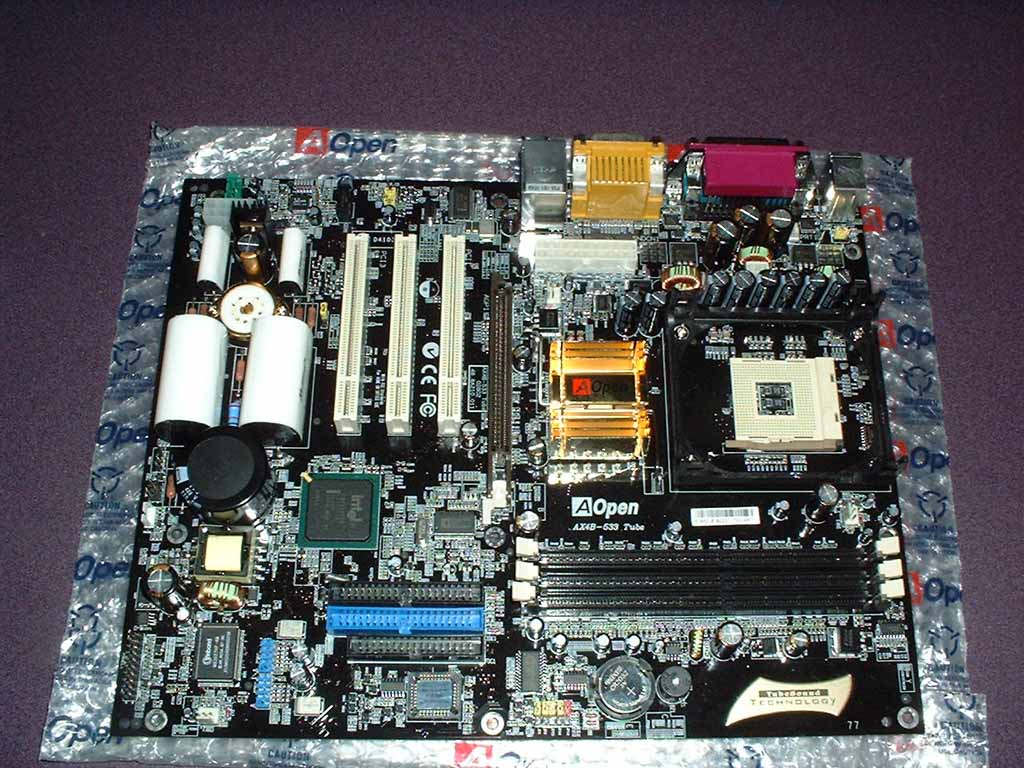
Fundamentally, the differences between the AX4B-533 Tube and the AX4GE Tube-G deal directly with the new Northbridge. The most significant change that is unrelated to the TubeSound modifications is the transition from the Intel DA82562ET onboard NIC to the Realtek RTL8100BL NIC.
 |
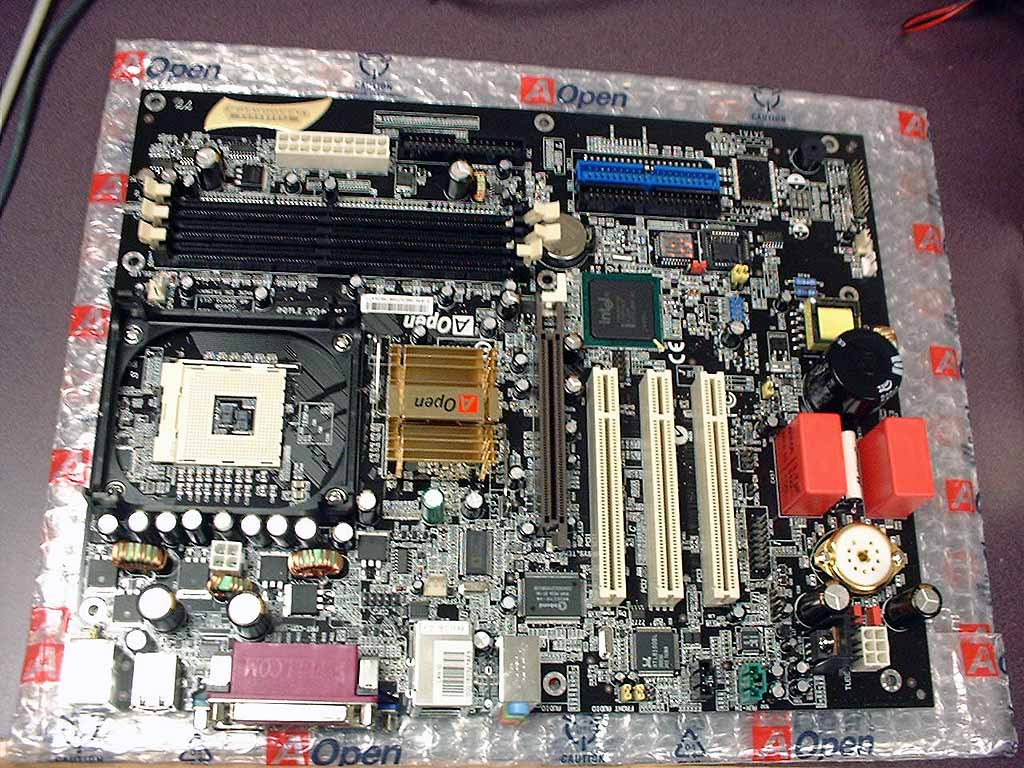 |
| AX4B-533 Tube layout | AX4GE Tube-G Layout |
 |
 |
 |
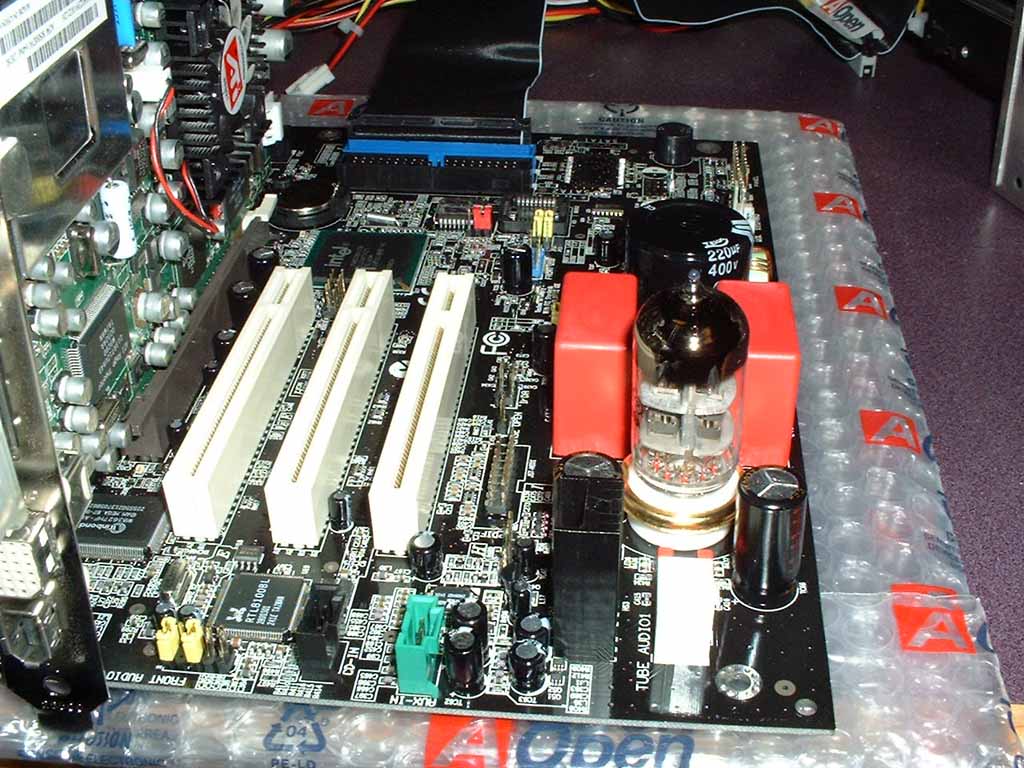
| TubeSound | Plugged in during testing | AX4GE's backplate |
Note that the TubeSound portion of the board takes up a significant amount of space, reducing the number of PCI slots down to 3. However, AOpen did elect to provide as many onboard features as possible in an attempt to make up for the reduced expandability. The AX4B-533 Tube and AX4GE Tube-G both come with the same vacuum tube, the Sovtek 6922 (which has about a $15 MSRP).
 |
 |
| Front of the Vacuum Tube | Back of the Vacuum Tube |
One thing that really surprised me concerning this board was the support for bioses, in a sense removing the need for a bios savior device.
 |
| Dual Bios support |
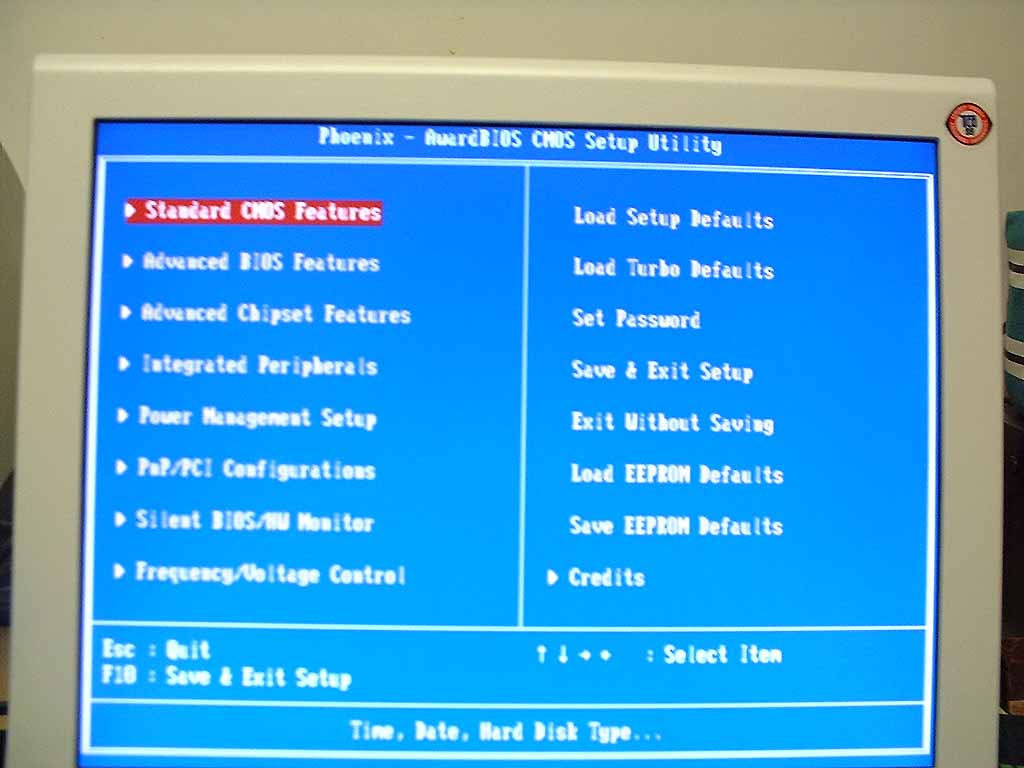
The bios for the AOpen AX4GE Tube-G offered a wide selection of options and tweaks, as well as a unique feature that saves your BIOS configuration to EPROM, allowing you to instantly load up a saved config with one menu command (which is especially useful when you reset your bios). The AX4GE Tube-G allows a wide range of voltage and frequency adjustments (and the only thing lacking was the ability to change DRAM multipliers. The only bug that I experienced with this board was the inability to change voltages past 1.55 (although the menu allowed me to select a maximum of 1.85v, the board's WatchDog timer didn't like it, and spit me back to 1.50v). Hopefully this problem will be addressed in a bios patch. Other than that issue, overclocking was no problem at all (although AOpen doesn't recommend overclocking this board due to the analog nature of the vacuum tube).
 |
 |
| Main menu of the bios | Frequency/Voltage |
AOpen Specific Features:
SilentTek/ Silent BIOS:
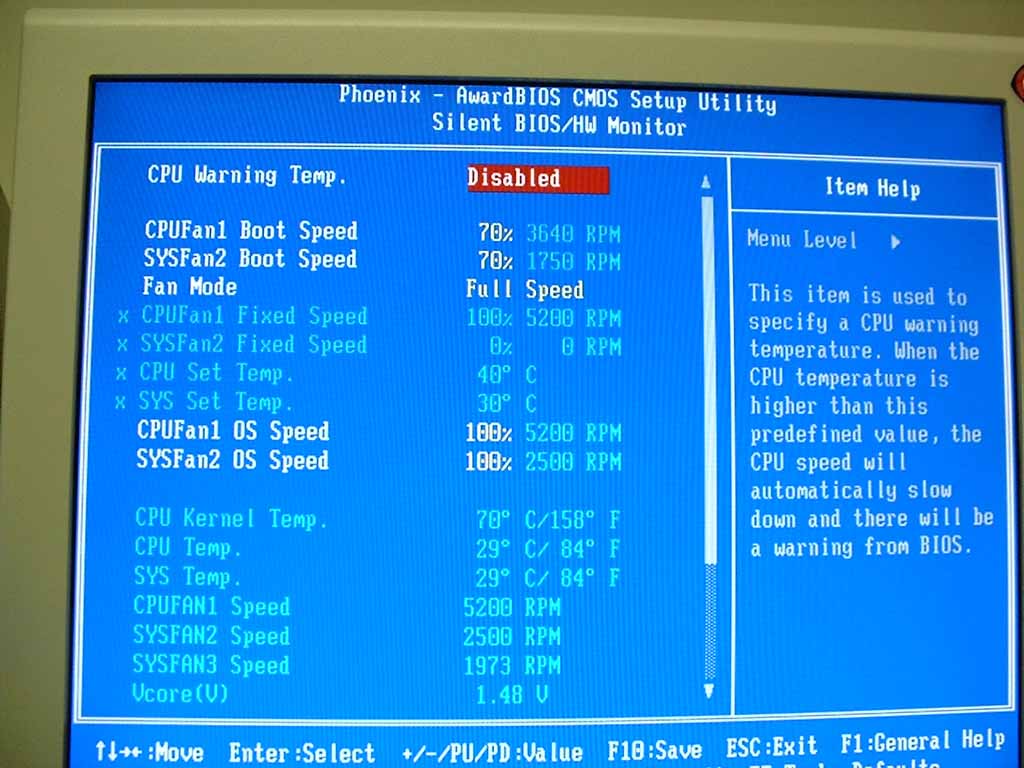 |
| Silent BIOS tweaking |
SilentTek is AOpen's proprietary suite of monitoring and control
hardware/software. For the most part, this is AOpen's own temperature,
voltage, and fan speed monitoring utility. However, there is one very
useful aspect of this feature, the ability to control fan speeds directly from
software. AOpen basically has integrated a variable baybus onto their
motherboard; allowing you to control fan speeds based on temperature, a fixed
speed (basically where fan speeds are adjustable from 0-100% in 1% increments),
or AOpen's own algorithm where fan speeds are adjusted by ambient temperature
and CPU usage.
This feature is really useful for reducing the overall noise of your computer,
and has been one of my favorite to tinker with (well, when I'm not
overclocking). It sure as hell beats a fanbus in certain aspects, and is
quite effective for quieting those loud fans.
The AX4GE-Tube also has an implementation of SilentBIOS, which allows you to adjust fan speeds and the smart algorithms inside the BIOS. Basically, SilentBIOS takes control of fan speeds before the OS boots (during POST, in the BIOS, and in the Open Jukebox application).
EzRestore:
EzRestore is a sort of "ghosting" system built for AOpen motherboards. This system isn't designed to create a mirror of your hard drive, but rather it keeps a recovery point of your system setup, allowing you to go back to a previous state. It's similar to WinXP's System Restore, but has some fundamental differences.
Open Jukebox:
Open
Jukebox is a CD player built directly into the motherboard BIOS, allowing
you to boot directly into their Jukebox utility and use your computer as a CD
player. Since this is part of the BIOS, all you have to do is hit a
specific key during POST to enter the Jukebox.
FIC has a similar BIOS
modification in one of their barebones systems, where the computer is
transformed into a DVD player. The Open Jukebox is completely skinnable
(and AOpen has a utility which flashes that specific portion of your BIOS)
I personally found this as a pretty neat feature (although most people wouldn't
use it too often).
The AX4GE-Tube expands the Open Jukebox software with Open Jukebox FM. This is an integrated FM tuner (which is available as an add-on module), allowing you to listen to FM radio without booting into the OS.
Watch Dog Timer:
AOpen's
Watch Dog Timer is one really neat feature for overclockers.
Basically, the BIOS monitors the POST process, and if the POST process fails it
will set the motherboard to automatically reboot in 5 seconds. Upon
rebooting, the BIOS resets the CPU to it's default frequency and starts the boot
process over again. Basically overclockers don't have to constantly pull
the reset CMOS jumper every time the computer crashes on POST, saving a lot of
time while experimenting.
This feature was really awesome and really sped along my testing. This
would probably be even more useful when the computer is inside a case, allowing
you to overclock on the fly.
Dr Voice II:
Dr Voice II is AOpen's onboard auto-diagnostic feature. Basically, the
motherboard talks to you when there is an error, informing you of the location
(memory, CPU, keyboard, etc). The feature supports four different
languages: English, German, Chinese, and Japanese.
Sometimes this feature got somewhat annoying, but it does allow someone to
quickly home in on a problem (rather than looking up beep codes or whatever).
Vivid BIOS:
Vivid BIOS basically is a skinnable portion of your POST process, allowing
you to use GIFs or even animated GIFs for display during the post process.
This was a neat little feature, for those people who like customizing
everything.
 |
| Vivid Bios flashing tool |
BlueTouch:
 The
Bluetouch basically is a series of 8 blue LEDs that surround the vacuum tube
onboard the motherboard, creating some pretty neat visual effects.
The
Bluetouch basically is a series of 8 blue LEDs that surround the vacuum tube
onboard the motherboard, creating some pretty neat visual effects.
It's a nice thing to show off if you have a window in your case. There is not much
functionality to it, but it is quite visually appealing.
| « Previous Page | Next Page » |