

Lite-On LTR-52327S
provided by Lite-On IT
reviewed by Andrew Chalfant
current price: ~ 45 US Dollars
Company Information
Lite-On was established in 1995 as an optical storage research and production company. Currently, they have over 130 engineers with Master & Ph.D. degrees on their R&D team, and have worked in developing Lite-On's patented anti-vibration mechanical design, advanced circuit design, firmware programming, and performance tuning. Lite-On is ranked among the top three optical drive manufacturers, and continues to grow as its product lines expand.
Introduction
CD Burning has come a long way since its inception. The first burner that I bought was an HP 8100 4x4x24, and that was fast. Back then, and even as recent as only a year or so ago, speed benchmarks mattered immensely when comparing drives with the same speed ratings, but ever since the advent of the 40x line of burners, speed tests have mattered less and less. With 52x burn speeds, it is not the minor speed differences (a few seconds here, a few seconds there) that matter. What matters is that the quality of the burns stays consistently high when writing at such speeds, and quality is that on which the review will focus - so let's see if the Lite-On 52x32x52 drive is up to scratch!
Lite-On LTR-52327S Specifications
- Speed :
52x Write CD-R
32x Rewrite CD-RW
52x Read CD-ROM Speed - Interface : ATAPI / E-IDE, support up to Ultra-DMA Mode2 ( 33.3MB/sec )
- Access Time : 80ms ( typical )
Buffer Size : 2MB - System Requirements :
CPU Pentium 166MHz or faster, 128MB DRAM required
HDD must have access time < 20ms, with a minimum of 100MB Free space
Support Operating System :
Windows 95 / 98 / NT / ME / XP / 2000 - Disc Format : CD / CD-R / CD-RW formats both 8cm & 12cm discs ( up to 99 mins )
- MTBF ( Life ) : 70,000 Hours
- Dimensions : 170.0 ( D ) x 145.8 ( W ) x 41.3 ( H ) mm
- Weight : < 1000g
Lite-On LTR-52327S Features
- Innovative SMART-BURN technology to automatically check media quality and set limit to burning speed to ensure successful writing sessions & data retainability
- Buffer underrun error free & automatically adjust writing strategy plus running OPC to meet various burning condition
- SMART-X supporting high-speed DAE & VCD extraction for copying and automatically decreasing speed to provide smooth & noise-free playback for CD Audio / VCD titles
- VAS® ( Vibration Absorber System ) to reduce vibration & noise during recording & reading
- Support Fixed Packet, Variable Packet, TAO, SAO, DAO, Raw Mode Burning & Over-Burn
- Support format of CD Family, CD-R & CD-RW media ( up to 99 mins )
- Conforms to Orange Book Part 2,3, Volume 3 : Ultra Speed & MMC2 commands
- Support Mt.Rainier
- Plug&Play Device with Emergency Manual Eject function
- E-IDE Interface, support up to Ultra-DMA mode 2
- Use FlashROM supports internet firmware upgrade
The Drive


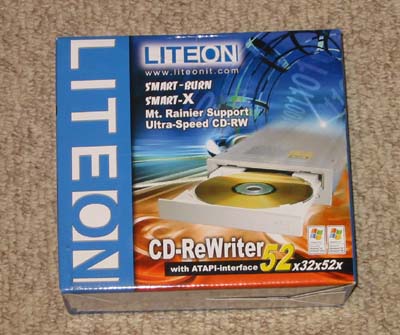
Having not received the retail package (merely the box), I am able to neither photograph nor enumerate the items included in the retail package. The drive itself is slightly different than the other Lite-On drives that we have tested. The front bezel is no longer flat, it is now rounded; additionally, the drive is shorter by about 2 cm, lengthwise. This means that the drive more readily fit in smaller cases with large PSUs or modifications. As you can see, the back of the drive has the standard ATAPI CD-ROM layout, with power, IDE connection, jumper settings, and input for an analog audio cable.
Additional Features
SMART BURN
Smart-Burn stands for Smart Monitoring & Adapting Recording Technology for BURNing. Unlike some proprietary technologies, Smart-Burn is not just buffer under run technology. It provides an entire method for dealing with poor-quality media, unlisted media, and of course, buffer under-runs. In one case, if the media is listed in the drive's firmware database, it will take its pre-defined strategy for this specific media and use it while burning. In the second case, if the media type is unknown, it will run OPC (Optimal Power Calibration) to evaluate the media and determine the appropriate writing strategy. Third, if the media quality is bad, the drive will run OPC and constantly reevaluate the writing strategy and change speeds over the course of writing in order to adapt to the inconsistent media.
SMART-X

SMART-X stands for Smart Monitoring & Adjusting Read-speed Technology for eXtraction. Smart-X works in two ways. First, it adjusts audio or video extraction form CDs to meet the needs of the program using it (for example, viewing a VCD or burning on-the-fly). Second, it checks the media for errors or scratches and slows down to ensure the best possible extraction.