

Review- AMD Athlon XP 2000+ vs. Intel Pentium 4 Northwood
Techware Labs gratefully recognizes AMD's support in making this review possible!
Review by Edward Chang, call sign: Big_E
May 7, 2002
Features:

Logic Symbol Diagram
QuantiSpeed™ Architecture for enhanced
performance
Nine-issue superpipelined, superscalar x86 processor
microarchitecture designed for high performance
Multiple parallel x86 instruction decoders
Three out-of-order, superscalar, fully pipelined floating
point execution units, which execute x87 (floating point), MMX™ and 3DNow!™
instructions
Three out-of-order, superscalar, pipelined integer units
Three out-of-order, superscalar, pipelined address
calculation units
72-entry instruction control unit
Advanced hardware data prefetch
Exclusive and speculative Translation Look-aside Buffers
Advanced dynamic branch prediction 3DNow!™ Professional technology for leading-edge 3D operation
21 original 3DNow!™ instructions—the first technology
enabling superscalar SIMD
19 additional instructions to enable improved integer math
calculations for speech or video encoding and improved data movement for
Internet plug-ins and other streaming applications
5 DSP instructions to improve soft modem, soft ADSL, Dolby
Digital surround sound, and MP3 applications
52 SSE instructions with SIMD integer and floating point
additions offer excellent compatibility with Intel’s SSE technology
Compatible with Windows® XP, Windows 98, Windows 95, and
Windows NT® 4.x operating systems 266MHz AMD Athlon™ XP processor system bus enables excellent
system bandwidth for data movement-intensive applications
Source synchronous clocking (clock forwarding) technology
Support for 8-bit ECC for data bus integrity
Peak data rate of 2.1GB/s
Multiprocessing support: point-to-point topology, with
number of processors in SMP systems determined by chipset implementation
Support for 24 outstanding transactions per processor The AMD Athlon™ XP processor with performance-enhancing cache
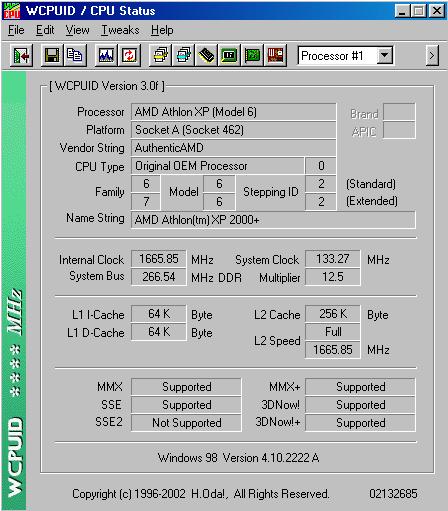
memory features 64K instruction and 64K data cache for a total of 128K L1 cache.
256K of integrated, on-chip L2 cache for a total of 384K full-speed, on-chip
cache.
Socket A infrastructure designs are based on high-performance
platforms and are supported by a full line of optimized infrastructure solutions
(chipsets, motherboards, BIOS).
Available in Pin Grid Array (PGA) for mounting in a socketed
infrastructure
Electrical interface compatible with 266MHz AMD Athlon XP
system buses, based on Alpha EV6™ bus protocol Die size: approximately 37.5 million transistors on 128mm2.
Manufactured using AMD's state-of-the-art 0.18-micron copper process technology
at AMD's Fab 30 wafer fabrication facility in Dresden, Germany.
Feature Comparison:
|
Processor Model |
AMD Athlon Thunderbird |
AMD Athlon XP 2000+ |
Intel Pentium4 Northwood |
|
Bus Frequency |
200 / 266 |
266 |
400 |
|
Clock Frequency |
600 ~ 1400 MHz |
PR1500 ~ PR2200+ |
1.6A, 1.8A, 2.0A, 2.2A |
|
Infrastructure |
Slot-A / Socket-A |
Socket-A |
Socket-478 |
|
Default Voltage |
1.75 |
1.75 with 20% Power Reduction |
1.5 |
|
Cache Size |
128K (L1) & 256K (L2) |
128K (L1) & 256K (L2) |
16K (L1) & 512K (L2) |
| Die Size |
120 square mm |
128 square mm |
146 square mm |
| Transistors | 37 million | 37.5 million | 55 million |
|
Process |
.18 micron |
.18 micron |
.13 micron |
|
Others |
-first seventh-generation x86 micro architecture -Enhanced 3DNow! |
-QuantiSpeed Architecture -3DNow! Professional -Thermal Diode |
-NetBurst™
-Quad-Pump FSB -SSE2 |
What's Included:
AMD XP 2000+ processor
AMD heatsink-fan
AMD case sticker
Manual
Installation:
Installing a processor is not to be taken lightly. It requires caution and carefulness. First, lift the lever on the side of the socket. Then, match the pin configuration on the bottom of the processor with the holes on the socket and inserted the processor into the socket. Closed the lever back in place after the processor is properly inserted. Now, apply a tiny amount of thermal compound, such as Arctic Silver II, to the core's surface. Or, if using a stock Putting a CPU cooler on an AMD processor can be potentially harmful. It could crack or chip the CPU's core, thus disabling it, permanently. Now, the dangerous step. First, orient the bottom of the heatsink-fan with the socket. Then hook one end of the heatsink-fan, in my case a GlobalWin CAKII-38, on the socket and carefully apply pressure, using a flat-head screw driver, to fasten the unlatched end to the socket. During this process, I advise using one hand to hold the CPU cooler still over the processor, ensuring that it will not wobble and chip at the core's corners. A shim comes recommended. With this done, plug the CPU cooler's power cable into the motherboard's fan connector and everything is set.
On with the benchmarks!

