

|


Asus N10 Netbook

Seven days with the Asus N10:
Day 1:
Initial reactions after inspection of the N10 were that I like the fit and overall, the screen bezel is overly large. I am not sure I will keep it due to this aspect. Boot up is very fast for Vista Business. The OS is loaded with tons of Asus software which I will likely blow away. Loading software is faster than on all previous Atom machines I have tested. Keyboard input is perfectly natural, I can touch type without any slowdown. Keyboard layout is very nice with the exception of the right hand shift key which is half size, though I dont really use it as much as the left hand shift key. BLUE LED's for indicator lights, finally someone is listening to feedback from consumers. The included Wireless N Atheros adapter is very fast and picks up networks that my MSI Wind does not, I may have to get an N adapter for my desktop.
Day 2:
Im just not a big fan of Vista and simply keep thinking how much extra performance I could get out of XP Pro. It seems that Asus has created a hidden 9GB partition loaded with both Vista Business and XP Pro that can be restored by using a disk that uses Norton Ghost. Restoration of XP Pro using the included disk took 1 hour 25 minutes, after which installation of the all in one driver/software disk ate up another 30 minutes. I actually let the Asus disk install all of the software back into XP, most of it is very useful and not the original bloatware I expected it to be.
Activated the biometrics today as well. I simply like the idea of dual security on my portables, that being password and biometrics. I also like that you can opt to have the biometic software log you in to the laptop and remember passwords for automatic login to websites with a swipe of your finger. I can now honestly say that I have given several competing sites "the Finger".
Day 3:
I knew it wouldn't be long before I tested 3D applications and gaming on the N10. I can say that while it handles most 3D gaming with ease you won't be playing the latest titles unless you like a slideshow. It is however great for playing the online 3D flash games Im addicted to as the 9300 runs circles around the Intel GMA 950 in Open GL applications. Two interesting observations were made during testing.
- The Intel GMA 950 actually performs better in D2D Graphics than the Nvidia 9300 and helps HD scores on benchmarks.
- Activating the Nvidia 9300 boosts scores of FPU, Memory, GDI, and OGL considerably in benchmarks.
The Atheros Wireless N card is truely on some serious steroids as I was downloading files between 2.0 and 3.0Mb/s from a Wireless G router connected to a business class cable modem. My Wireless G equipped laptop caps out about 1.0Mb/s on the same connection. Asus can you send me a few more of these little gems?
Day 4:
First day taking the N10 on the road for a business trip. Everyone noticed the N10 and wanted to play with it, was fun showing it off at first then it just plain got annoying. Go buy one people, stop asking for mine. Now I have an N10 with their fingerprints all over it. Asus includes a wonderful carry bag but noticeably absent is a polishing cloth. What gives Asus? Even XPS laptops come with the little cloth that cant cost more than $3 US.
The N10 survived a 4 hour long meeting without needing to be plugged in (using intel graphics). I was able to run with 100% screen brightness the entire time. I absolutely adore the glossy screen for viewing information and video content. The N10 was quite a bit faster than several other users P4 based laptops which were present. We were given access to an internal network containing demo software which we were told we could copy if we wanted. I downloaded the entire directory at 30GB figuring I would sort through the data later. On that note the included 320GB HD is very roomy though not the fastest drive I have used. I just noticed that Asus has decided to format the 320GB hard drive as FAT which has left me scratching my head and trying to figure out how to convert it to NTFS without destroying the hidden partition.
Day 5:
Took the N10 to the local internet cafe (Panera Bread) for some productivity and java (coffee). I was asked 9 times which laptop I was using and none of the people had ever heard of Asus. Asus may have created the ultra-portable, low cost, netbook market but most in the US are still unaware of their existance. With the advent of the MSI Wind and many other manufacturers entering the netbook market Asus needs to kick it up into high gear if they want a continued market share in the US.
Either the formatting of this hard drive as FAT is causing a lot of overhead and thus lag, or the Asus software accesses the hard drive very often, but the result is that the OS is sometimes very laggy. Opening applications takes longer than on an MSI Wind at times, and at other times it opens right up. There also seems to be issues related to connectivity on the wireless and wired LAN connections that is only solved by disabling and re-enabling the device. This can be very annoying to those who travel alot. The touchpad deserves a mention as its probably one of the best touchpads I have seen on a laptop, nevertheless one of this size. I am a big fan of placing the biometrics between the right and left mouse keys instead of in the palm rest of on the bezel as some other companies do. Additionally the right and left mouse keys are appropriately sized and very easy to use, unlike the early single toggling mouse key that came of the EeePC's and the MSI Wind. These keys are also chroms plated and look great.
Functionality wise I have found the wireless switch is much less often used than the graphics switch and these switches are also not made of high gloss chrome and are instead of a matte finish to blend in better with the rest of the chassis. I took the time to read through the manual and found it to be very thorough, I had absolutley no questions left after looking through it for 10 minutes.
Day 6:
I have decided to blow away most of the Asus included software to see if it is the software that causes the hard drive lag or the FAT file system. If that doesnt work then I will use the included CONVERT.exe to change C over to NTFS.
Removal of the Asus software did not change the lag in the drive so I have moved forward with converting the file system to NTFS. The entire process is rather simple and required that I enter into the command prompt by typing cmd at the run command. At the command prompt you simply enter CONVERT C: /FS:NTFS and the system will prompt you to dismount the drive which of course will be unsucessful because its current running from C. You are then prompted to attempt the conversion at the next restart which I selected to do. The restart and resulting conversion process took a total of 7 minutes.
The result: The system was a lot snappier once the conversion to NTFS took place. Applications and OS performance was must faster.
Day 7:
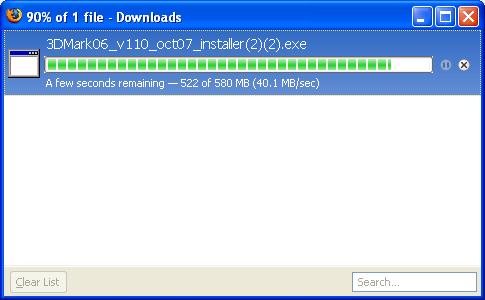
Discovered today that the ethernet (wired) port is gigbit capable resulting in very fast connections and transfers on such networks. As you can see my connection speeds on a gigabit enabled network were rather nice.
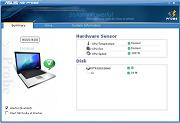
I found that rather surprising for an ultra portable but I'm certainly not complaining. The biometics logon continues to be a nice addition as is the software's ability to remember passwords and logons using your fingerprint to unlock them. The webpage and application zoom hotkey is not functional under Windows XP which is a bit disappointing. The included Asus NB Probe that monitors drive, CPU, and sytem status is completely useless and reports rather useless information, such as my CPU temp is normal. What qualifies as "normal". Our tests with a laser thermal probe on exhaust port temps showed 99.5 degrees F or 38.5 degrees C which is relatively cool but by no means cold for a CPU supposedly consuming 5w but closer in reality to 3.5w @ 1.038V at idle.
NOTE: Temperatures were taken on the left side exhaust port with a calibrated laser thermal probe with the N10 set to super performance, using the Intel GMA 950 graphics, running on AC, and having run for 2 hours.
NOTE: Temperatures with Nvidia Graphics enabled: 44.5C or 112.5F. Same conditions as above.
Temperatures would undoubtedly be higher running with the Nvidia 9300M enabled.
Click thumbnail for a Larger Image.
REALTIME PRICING