

|


ineo NA303US
External Hard Case and Docking Station
 |
Package contents

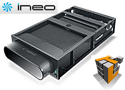
The NA303US comes with everything you need to get up and running short of the hard drive. The top and bottom covers though are made of metal and will assist with the dissipation of heat from the hard drive. The frame which holds your hard drive is made out of plastic which may result in a less rigid case structure and affect longevity and durability. One weak point with the frame being made of plastic is the four tiny screws which hold the bottom plate in place. These screws go directly into the plastic frame and will strip easier over time than a metal frame, of course this only becomes an issue if you install and uninstall a hard drive several times into the NA303US. If you are a user prone to using multiple hard drives in such enclosures then you may want to seek a different solution. The NA303US comes with a docking station which will be mounted into your workstation’s 5 ¼ drive bay. This feature will save you an electrical outlet for a standard external hard drive and will be a time saving device as all you have to do is insert the hard drive for it to become recognized. The docking station plugs into your workstations molex power and a SATA cable plugs into the motherboard. The NA303US also comes with the external power brick for those times you want to plug the NA303US into another PC which doesn't have the docking station installed.
Benchmarks
 |
 |
Sisoft Physical Disk Performance |
Sisoft Physical File System Benchmark |
The two benchmarks shown above provide insight into how the SATA drive performed mounted inside the NA303US. These results are very impressive as most of us today are use to external drives being connected via a USB 2.0 port with data transfer speeds of 400Mps. Other portable drive case which are a little expensive come with the option of eSATA which require the user to connect a cable to the back panel of their PC, which can be an inconvenient for some who have their machine sitting in a desk hutch and pulling the case out every time to connect a cable is a real hassle. Now, we did have an issue with one of our older mother board not recognizing the drive while in the docking station, but when we removed the SATA drive from the case and attached it to the motherboard directly, the motherboard saw the drive without an issue.
REALTIME PRICING