| Linux: The Beginners Guide |
|
Linux: The Beginners Guide
Enabling Repositories
A repository is a place where data is stored. In this case when you enable repositories, you are allowing your computer to search a large environment for software updates and other programs that it may have not found with them disabled. We also must have then enabled for certain updates for the CompizConfig Setting Manager discuss later in this guide.
- Open Synaptic Package Manager (shown on page XX)
- Click on Settings-Repositories

- Check the first 4 options:
- Canonical-supported Open Source Software (main)
- Community-maintained Open Source Software (universe)
- Proprietary drivers for devices (restricted)
- Software restricted by copyright or legal issues (multiverse)
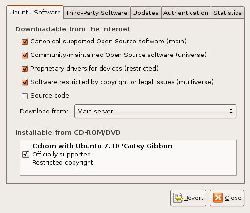
- Now press “Apply” to download and install the packages marked.