

| The Squeezebox by Slim Devices |
|
|


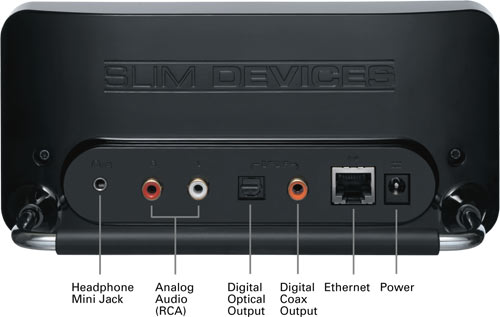
Taking a look at the rear of the unit, from left to right we have the headphone mini jack which we used initially during our setup, left and right analog audio jacks (RCA), a digital optical output port, a digital Coaxial output port, an ethernet port and the power port.

Following the connection diagram and/or Owner's Guide was very easy for installing the plugs needed to get this up and running quickly. We quickly found that all we needed to connect initially was the power cord, and the headphones. We would then need to proceed towards the installation of the software for the pc/server called "SlimServer", as we elected to install this on our Windows2003 Server, the software installed quickly and without any effort on our part. The software is downloaded from the Slim Device web site which ensures that you have the latest software revision, but we wondered what would someone do if they had no internet connection the day they wanted to install it and listen to music. It might be nice to somehow include the software on a very small USB stick.
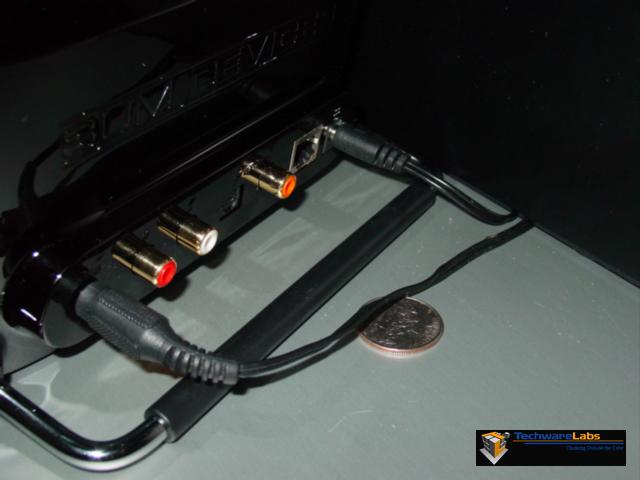
After connecting the power cord and the headphone jack to the Squeezebox, we wanted to show you how nice and small the footprint is for the backside of the unit, and placed a quarter for size comparison in the picture and to showcase the clean backside of the unit.
| « Contents | Squeezebox Connectivity and Interface » |