

| The Squeezebox by Slim Devices |
|
|


Software Interface:
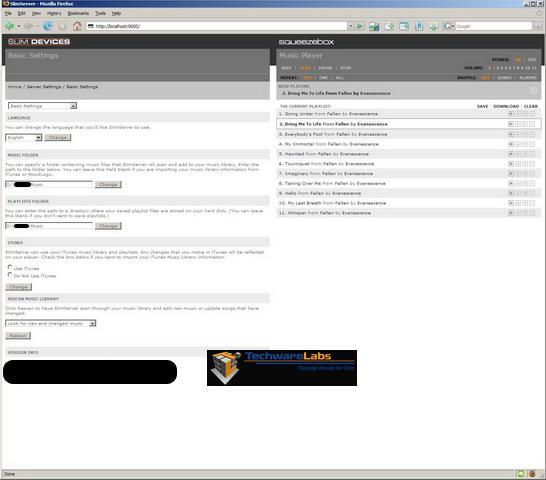
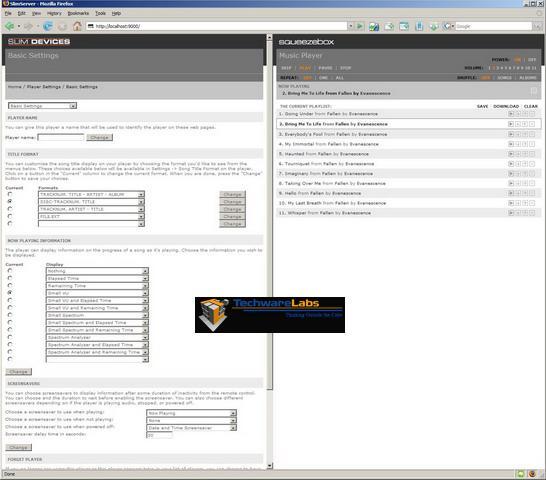
The SlimServer software is very straight forward and easy to understand and opens up in your web browser. We found the software to be robust, allowing you to alter anything you would need to, from the name of your Squeezebox personalizing it, to the playlists it will be playing eventually on your device.
At the main 'Home' screen, you are presented with numerous lists of different options that you can set. The right side of the screen shows the controls for the Squeezebox Music Player, such as skip, play, pause, stop, repeat, shuffle, volume and power on/off. Below this you are shown the current active playlist of music. On the left side of the main "Home" screen you are presented with the ability to browse through your folders through various methods such as through artists, albums, genres, years, favorites, random mix and playlists; with the ability to conduct searches for music; with the ability to setting up internet radio streams; with changing your settings on your Squeezebox device; adding plugins, as well as a list of online help guides. Click on thumbnails to enlarge images of each of the SlimServer software interface pages.

We would like to point out that unlike having an ipod of 60Gb and some speakers for your current stereo device, the Squeezebox by Slim Devices quantity of music playback is only limited by the size of your hard drive and music library. So I can imagine having a 500Gb to a 1 Terabyte hard drive nicely organized with your music folders and directories easily accessible from anywhere within your wireless range!
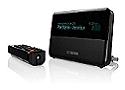
As was stated earlier, we initially set the Squeezebox up in the office so obviously the music quality, speed, etc would all be fast here. As we moved the unit to the family room and hooked it up to our current stereo system, we were just pleased to report that by merely unplugging the power cord and the headphones/speakers, that the Squeezebox suddenly becomes a very mobile device for listening to your music storage folders from anywhere within your wireless output range. Relocating the squeezebox could not have been easier. After placing it in an easily viewable place near the home stereo, we took the RCA audio cables out and promptly connected it to our stereo's auxiliary RCA ports, plugged in the power, hit the "On" button on the remote and just like that the display came alive! Right away the Squeezebox's display got right to work, first letting us know the name of our now personalized music system was, then accessing the network, resolving with the DHCP server and as fast as you can read this, we were once again up and running once more. Using the remote, I easily and quickly browsed to my music folders and started playing my music. The rich sound that came from the speakers left us in awe, and right away we remembered that we were accessing the Win2003 Servers local music folder from across two rooms through two walls and a vast span, all the way out next to the pool deck. The 802.11g wireless signal was flawless as the music played as quick as I could select it, as I raced through the menus to see if I could trip up the mighty Squeezebox, causing the music or menus to pause, stop playing, or develop a jitter or hitch. None of these negative effects that could occur on this wireless system happened and we were pleased to find that it easily outperformed another wireless music device tested with absolutely no scratchy sounds, hissing, interference, etc... streaming the music from our server. At a physical size of just 7.6" wide x 3.7" height x 3.1" deep, the Squeezebox is by far the best music accessory for any audiophile to truly enjoy their collection of digital music audio from anywhere in their home or office. The Squeezebox can best be described as a "Digital Network Music Access Gateway" as it easily allows its users to access music wirelessly and wired on a network.
 The Slimserver icon.
Features:
The Squeezebox includes:
- High fidelity 24-bit Burr-Brown™ DAC.
- Digital optical, Coax, and Analog connectors.
- Built-in 802.11g and one ethernet port
- Plays MP3, WAV, FLAC, WMA Lossless, WMA, Apple® Lossless, AAC and OggVorbis files from your computer.
- Stunning Aqua-Blue display with graphic visualizers.
- Search functions allowing you to quickly search using various means of locating exactly what you seek.
- Access to virtually any internet radio station and RSS feeds anytime, even without a computer.
- Works with iTunes library, MusicMagic, Live365, Moodlogic, Pandora, RadioIO, Radio Time, Rhapsody, Shoutcast, and Windows® Media Radio.
- Add additional Squeezebox players throughout the home, to stream music anywhere.
- Clock with alarm feature.
- Wireless Bridge feature.
- Available in White or Black.
- Software for WindowsXP/2000.NT; Macintosh Mac OSX 10.3.5 and later; Linux/ BSD/ Solaris:Perl 5.8.3 or later
- Best when used with a broadband internet connection for RSS and Internet Radio streams.
- Retail Price: $249.00 to $299.00
| « Squeezebox Connectivity and Interface | Conclusion » |