

|



Hacking the I4-BC
Although it isn't really hacking since all you are doing is typing a line in a Notepad and saving it as autorun.inf but typing this line and putting it into the directory of an SD card will make the device run outside parameters specified by the manufacturer, thus I will call it hacking.
Here is the standard warning:
TechwareLabs is not responsible if you play around with your GPS and mess it up in the process. These instructions will make the device run outside the parameters set by the manufacturer so use at your own risk...
Now that we go that out of the way, lets proceed.
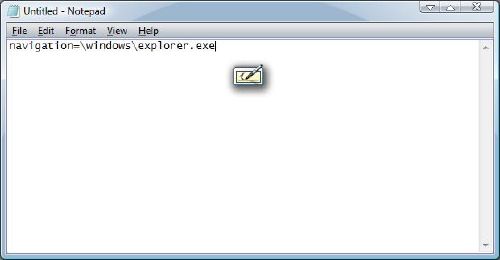
All you have to do to hack this GPS unit is to
1. Open up a Notepad on your computer and type in "navigation=\windows\explorer.exe"
2. Save as "autorun.inf" on the SD Card.
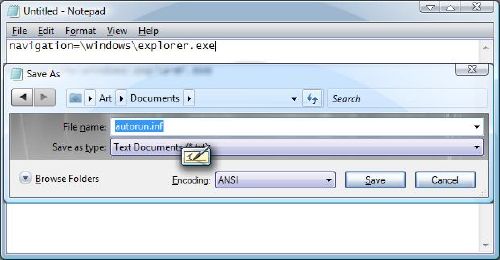
3. Plug the SD Card into the GPS.
This command will take out of the main shell and put you into the Windows CE Desktop. There you will have access to things like the Control Panel, Internet Explorer and the command prompt. I have included some of the pictures from the Widows CE environment below
 |
 |
Desktop |
Start Menu |
 |
 |
Control Panel |
Internet Explorer |
 |
Command Prompt |
Note that you do not necessarily have to just type in "navigation=\windows\explorer.exe". You can substitute the autorun command to something else such as "navigation=\windows\iexplore.exe". This command will lunch internet explorer when the SD Card is plugged in.
In fact, if you have a particular program that you would like to run, you can put it on an SD card and then substitute the directory to MMC Storage instead of Windows.
OTHER RELEVANT REVIEWS
Mio Digiwalker C520 GPS |
CLICK HERE FOR REALTIME PRICING ON THE NEXTAR I4-BC