

|


Software:
A full explaination of the workings behind the WiLife Command Center, please check out our review on the Logitech WiLife Security System. We were previously unable to check the multi-camera functionality of the command center, so now that we have the additional cameras we were able to test it out. The rest of the page will be showing the multi-camera functionality of the command center.
As you can see in the following pictures, the three different views were tested and no problems arouse. These screen shots were taken when the camera was pointed directly at a wall, only inches in front of it, thus explaining the complete darkness.
Single Camera |
Four Cameras |
Six Cameras |
 |
 |
 |
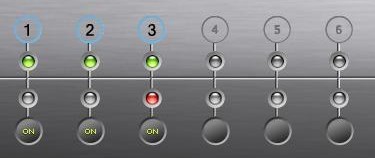
In live mode, the bottom segment of the command center has status lights for each of the attached cameras. As you can see in the images, there are three cameras detected and all turned on. This is showing correctly as we are only using the indoor, outdoor, and spy camera.
The playback mode allows you to see the videos that were previously recorded. This shows you a list of all cameras attached along with their corresponding recorded times (shown by highlighted segments on the timeline).
