Testing the Driver:
 |
 |
 |
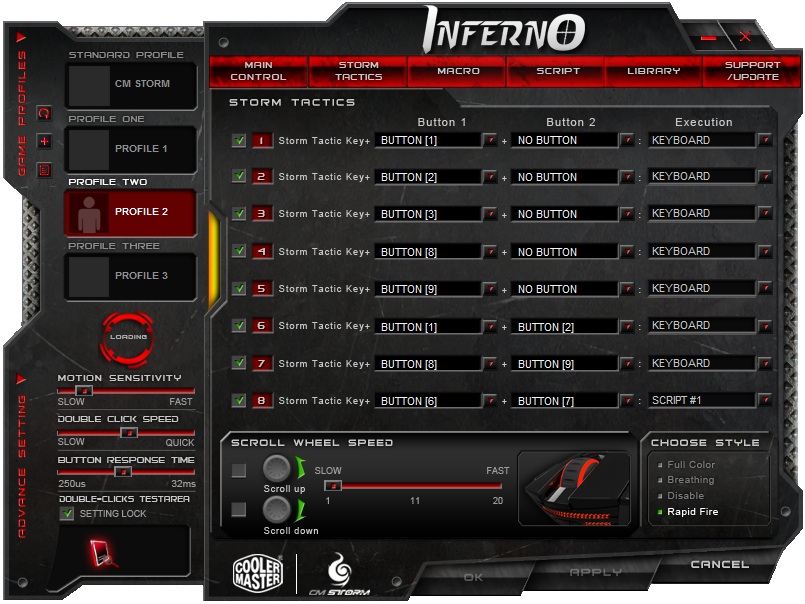
And now the driver software which I promised to mention: The Inferno is supposed to be capable of some very advanced macro programming. However, I was never able to make it do anything I wanted to, as the software’s UI is terrible. Scrollbars in the context menu invoked when assigning functions to a button? Okay, I can see it. Limiting these context menus to five visible entries regardless of screen real estate? Bad call. There’s a lot of flashy stuff, and a generally difficult, counter intuitive user interface. Fortunately, once you’ve got it set up, you never need to see it again thanks to on-board profiles. The good news is that 1.1 seems to have removed all the stability issues in the 1.0 driver. Also, to be fair, it only hung twice while trying to flash new settings to the mouse – these drivers are not, as I have them configured, memory resident. This will be welcome news to the sort of folk who pare out every unnecessary service, piece of graphical chrome, and excess process in the hope of squeezing out every last frame per second from aged or marginal hardware, or just want a clean and stable system while playing.
In Conclusion:
The Inferno is a fairly decent mouse on its own merits. The wide, illuminated mouse wheel feels nice, gently tactile while rolling, and is never hard to click. The bonus buttons are far enough away that you’ll never hit them by accident, but never so far that you’ll have trouble hitting them. The profile in use announces itself with a tri-color LED under the profile switch. The thumb buttons are sufficient, and have been growing on me. If you’re a southpaw, you’ll find the Storm easy to hold, but you’ll regret that Cooler Master didn’t go whole hog and make the thumb buttons ambidextrous as well. Were I one for prognosticating, I would speculate that a lefty version of this mouse may be waiting in the wings if the initial offering does well. Which it deserves to – while the software has some very rough edges, you only ever need to look at it once, and all of its competition – dedicated MMO mice – cost at least half again more than the Inferno. Even FPS gamers and simulation lovers would do well to give the Inferno a look, for when you pare away all the bonus features, you’re left with what is really a nice mouse. And if you need those bonus features? It costs like an entry-level gaming mouse.

[…] R.A.T. 7 Review – the ultimate mice?SteelSeries Siberia V2 Special Edition Blue Sneak-Peak ReviewTechwareLabs Review: Cooler Master Inferno Gaming MouseSteelSeries Siberia Neckband Headset ReviewSandberg Street Gear US Play Review @ […]
[…] TechwareLabs Review: Cooler Master Inferno Gaming Mouse […]
[…] Siberia V2 Special Edition Blue Sneak-Peak @ Kitguru- Cooler Master Inferno Gaming Mouse @ Techwarelabs- CES 2011: OCZ Technology @ ThinkComputers- CES 2011 Coverage Compilations @ Futurelooks- Cyborg […]