Windows Score
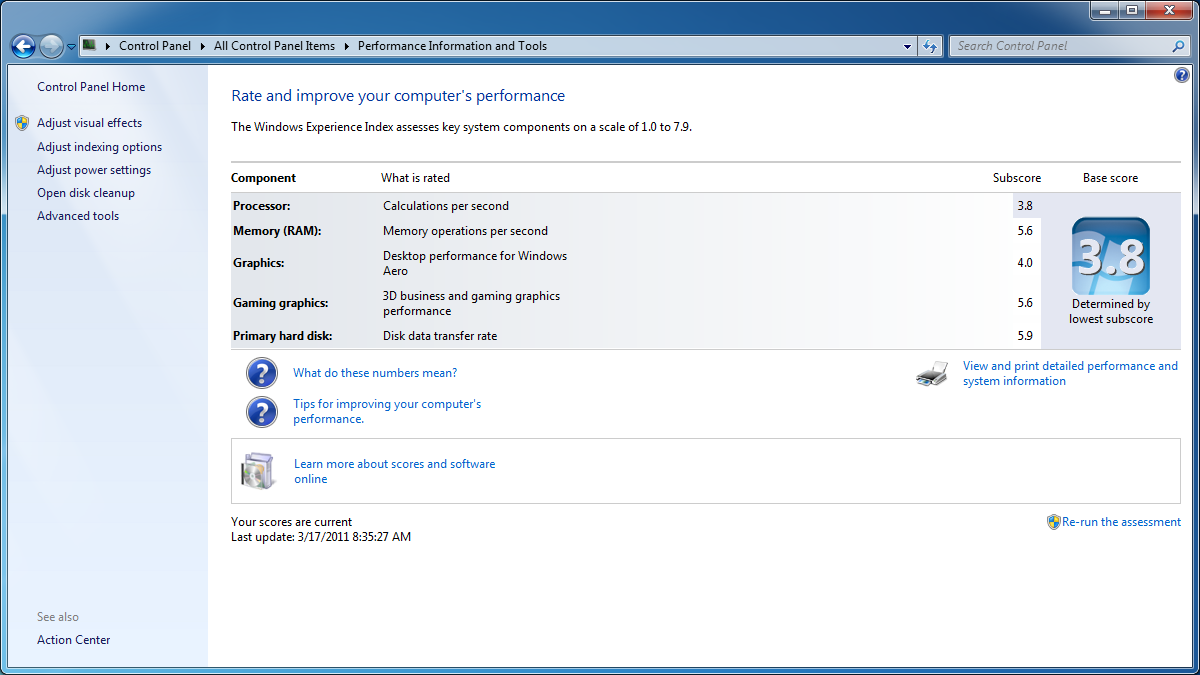
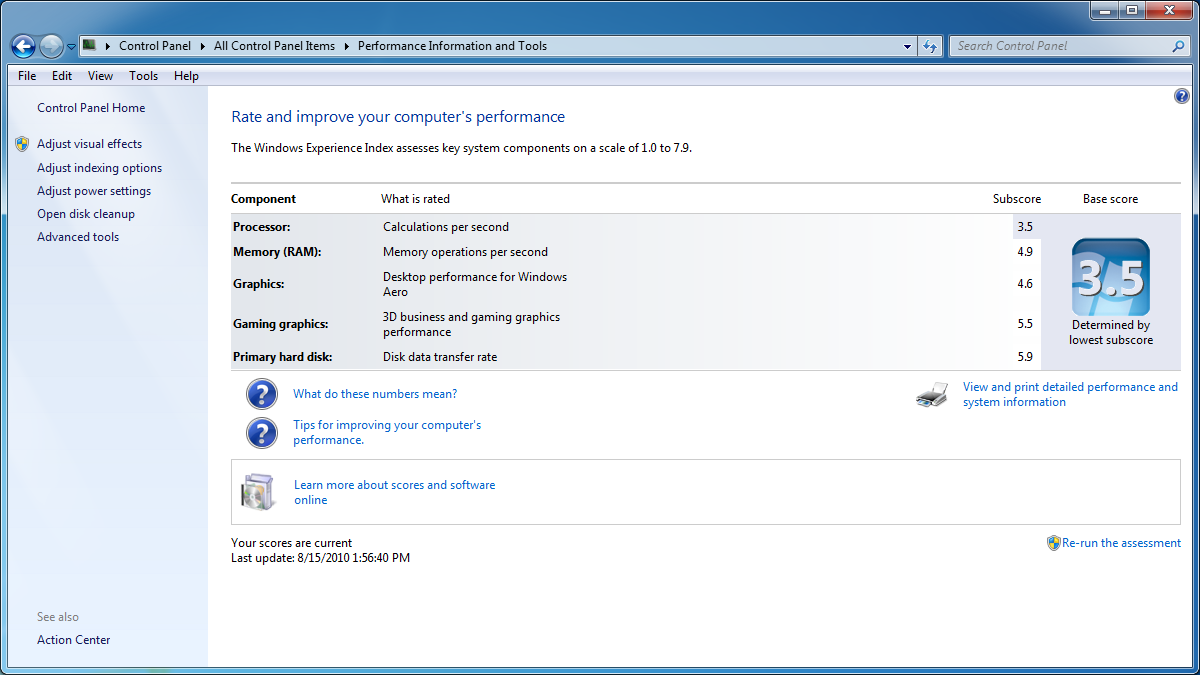
The scores in the previous tests are further verified by the Windows built in benchmark. As you can see in the images below, The performance of both machines are relatively matched. It is important note that the ION 2 Platform in the JNC98 performed better than the Radeon HD 6310 performance in the E350N. On the flip side, however, it is rather disappointing to see the 1.8 GHz Atom lose out to a slower (yet faster) 1.6 GHz, E-350. The overall score is rated by the lowest component, which in both setups happens to be the processor. This means that E350N wins this test as it deliver “better overall performance” according to Windows.
 |
 |
Conclusion
So what is the bottom line in this comparison? Well as I mentioned earlier both boards are priced about the same. You can get the Gigabyte E350N-USB3 for $149 or you could grab the JNC98-525-LF for $169. The Gigabyte board sounds like a better deal, but looks can be deceiving. In fact, the problem comes in with the other stuff that the board needs to function. Both boards are mITX so they would fit in the same case and could use the same power supply. But each board requires different RAM. The Atom board uses DDR2 which is older but and is not as cheap as the DDR3. You could grab a DD2 4GB kit for $56 or go for DDR3 for $46. This means that the overall prices of the rig would differ in about $30. It is my belief that $30 is not a deal breaker, so the choice ultimately falls to user’s preferences. If the user is more inclined to watching movies and multimedia then the better option of the 2 would be the JNC98, however, it it is value/cost then better choice would definitely lie in the E350N-USB3.
Some other key considerations that the Gigabyte E350N-USB3 brings to the table are its inclusion of USB 3.0, DDR3, SATA III, and MUCH more powerful CPU than any Atom based platform currently on the market. As a whole these features make the E350N-USB3 a much more powerful and versatile board and at a cheaper price.
The addition of a x4 PCI-E slot with a x16 form factor means you can include a more powerful graphics adapter at any time turning this mini machine into your mini gaming monster.
Editors Note: Given the bumpy history of Nvidia chips, AMD Radeon cards have become my preference for their lifespan. Heat, and power efficiency are more a factor of which card you choose rather than the manufacturer but in the end I like knowing that my video card wont up and fry and potentially take my system with it.

[…] Gigabyte E350N-USB3 Motherboard @ TechwareLabs […]
[…] have what it takes to take on the proven ION2? Join in for a battle of mITXs you won't want to miss!http://www.techwarelabs.com/gigabyte-e350n-usb3-motherboard/DiggLeave a Reply Click here to cancel reply. Name (required) Mail (will not be published) […]
[…] Gigabyte E350N-USB3 Motherboard @ TechwareLabs […]
[…] […]