
Introduction:
With the holiday season nigh everyone is getting together their lists for the best gadgets and gear of 2009. One item that doesn’t usually receive much attention is hard drives, frankly very little changes between drives. The lack of fan fair in this market has allowed Seagate to subtly release the Barracuda XT in a 2TB flavor while that by itself is unremarkable the fact that it comes in the new SATA III standard couldn’t get much better unless they wrapped it in bacon. Theoretically by doubling the SATA pipe you allow for a staggering 6GB/s data transfer, coupled with a beefy 64mb of DRAM could this be the drive to beat? Follow me while we review this potentially impressive drive.
 |
Key Features:
- A massive 2-TB drive capacity provides plenty of room for downloading today‘s space-hungry PC games or up to 45 hours of 1080i, HD-DVCPRO-encoded, high-definition video.
- The 7200-RPM performance platform complements high capacity, delivering a power combination of extreme storage and top-end desktop performance.
- A 64-MB cache optimizes burst performance and reduces data throughput bottlenecks.
- The SATA 6Gb/s interface enables the use of the industry‘s newest and fastest hard drive controllers while providing backward compatibility to legacy SATA 1.5Gb/s or 3Gb/s systems.
- Configurable with Seagate® SeaTools™ software—Users can optimize the drive configuration and tune for capacity or performance for the ultimate in customer choice and control.
Overview:
Just to wet your taste buds….
| Model | ST32000641AS |
| Interface | SATA 6 Gb/s |
| Cache | 64 MB |
| Capacity | 2 TB ( 2,000 GB) |
| Areal Density (avg) | 347 Gbits/inch2 |
| Spindle speed | 7200 rpm |
A closer look:
In today’s world where you get fancy packaging to go with the latest hardware, I was to be very surprised when Seagate sent the Barracuda XT in nothing more than a OEM clear plastic case, very low tech but none the less effective at protecting the drive, hopefully the consumer will feel all that extra savings…
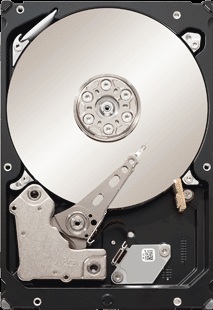
The drive itself does not have much to commend physically. The drive looks like a standard 3.5 inch drive thicker than some but by no means a large drive.
|
A close up of the label on the disk. |
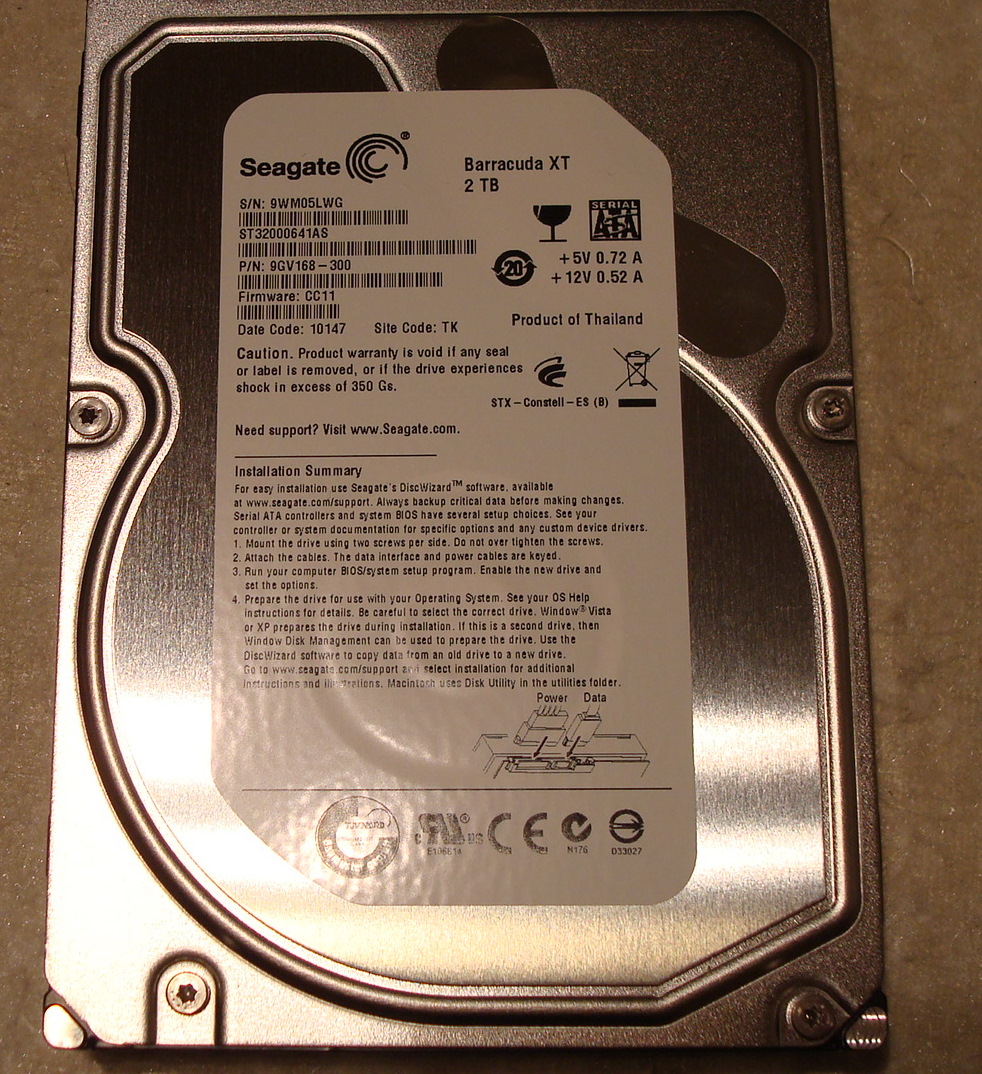
Hopefully the benchmarks show a more unique drive because Seagate really went all out trying to make this drive stand out…. just kidding.
Taking a closer look at the specs will hopefully reveal a bit more about this drive.
| Model Number: | ST32000641AS |
| Interface | SATA 6Gb/s |
| Cache | 64MB |
| Capacity | 2 TB |
| Areal Density (avg) | 347 Gbits/inch2 |
| Guaranteed Sectors | 3,907,029,16 |
| Height (Max) | 26.1 mm (1.028 inch) |
| Width (Max) | 101.6 mm (4.0 inches) |
| Length (Max) | 146.99 mm (5.787 inches) |
| Weight (typical) | 700 grams (1.543 pounds) |
| Spindle Speed | 7200 rpm |
| Average latency | 4.16 msec |
| Random read seek time | 8.5 msec |
| Random write seek time | 9.5 msec |
| MTBF | 750,000 hours |
| Annual Failure Rate | 0.34 |
| Unrecoverable read errors | 1 in 10^14 |
| 12V start max current | 2.8 amps |
| Average idle current | 6.39 watts |
| Operating | 5 to60 degrees C |
| Non-operating | -40 to70 degrees C |
| Maximum operating temperature change | 20 degrees C per hour |
| Maximum non-operating temperature change | 30 degrees C per hour |
| Operating Shock (max) | 63 Gs null 2 msec |
| Nonoperating Shock (max) | 300 Gs null 2 msec |
| Acoustics (Idle Volume) | 2.8 bels |
| Acoustics (Seek Volume) | 3.2 bels |
A couple of interesting facts here, first this is likely 2 platter drive and as we can see it has a high Areal Density (avg). an increase in areal density almost always is followed by an increase in performance as well as the ability to read data more quickly. The spindle speed has not increased so we do not see a noticeable increase in the energy draw of this drive.
Testing:
Finally down to the meat and potatoes of a new hard drive the actual performance.
For the testing of the Seagate Barracuda XT we placed it in a mid-range Core i5 rig containing.
- Asus P7P55D Premium motherboard which we will be reviewing shortly (thanks to Asus for providing our testing platform)
- Thermaltake ToughPower XT 750W Power supply
- Core i5 750 (stock cooler)
- XFX Nvida GTS 250 graphics card
- 4GB (2x 2gb) Patriot Viper Ram ( DDR3 1333 )
- Windows 7 Enterprise.
- Antec Nine Hundred Case (and older case but still full of cooling goodness)
Everything booted up just fine after making several minor adjustments recommended by Asus namely. – Setting the Marvell 88SE9123 controller to AHCI mode, disabling Intel C-STATE, fully installing all the drivers for the Marvell 88SE9123 controller to version ( 1.0.0.1008) and lastly using a supplied SATA 6G cable which came with the motherboard.
Alright now that the system is set up lets fire up our benchmarks, we will be using. CrystalDiskMark , HDTune, Startup time, Windows Experience Index Rating, and transferring large files using windows own copy handler.
Booting
From a cold boot the system reaches the desktop in 55 Seconds assuming you shut of the Express gate feature of the Asus motherboard we are using, more on that in my next review. The longest part of the boot cycle is the motherboard post tests, if we measure from the time the Marvell controller is detected then our boot time is shaved to a mere 32 seconds which is pretty snappy.
Windows Experience Index Score
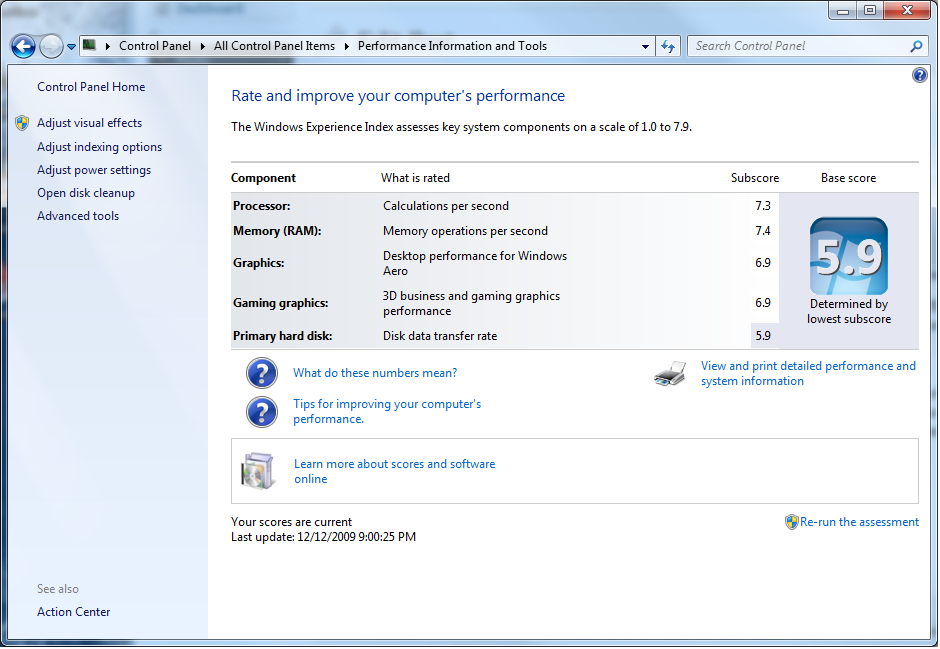 |
I have got to admit I was shocked at the score, 5.9 for a brand spanking new SATA III drive… I would have thought a higher number, perhaps this is a foreshadowing of things to come…
CrystalDiskMark
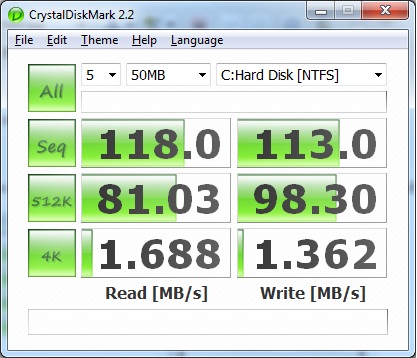
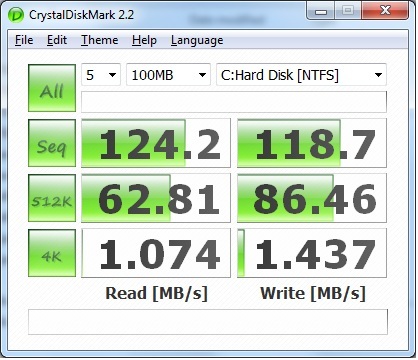
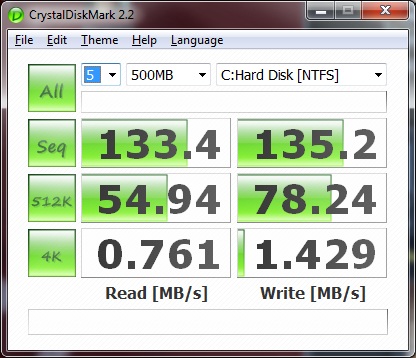
CrystalDiskMark is used to test the speed of sequential reads and writes, along with random reads and writes of varying sizes ranging from 50mb to 1 GB.
 |
 |
 |
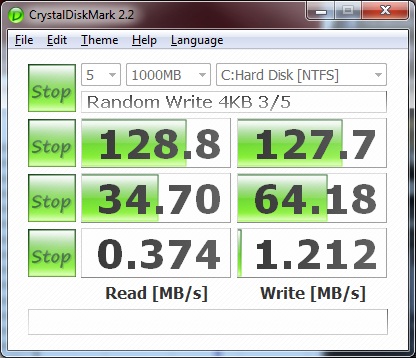 |
It would seem that the 500mb mark is the sweet spot for sequential reads and writes while the smallest file (4k) size apparently has a horrible a read speed speed and only a slightly better write speed. In actuality the this test is not very good for showing the true transfer rate for (4k) files seeing as they are significantly smaller than the MB/s that is set for a scale that being said .374 MB/s is acceptable for such small file fragments.
HD Tach
This test shows you the sequential read speed and for kicks I used the built in test logs to allow us to see the Barracuda XT compared to a Western Digital 74gb 10k RPM Raptor drive.
 |
I have got to say I am very surprised at how well the drive did in comparison to the WD Raptor although looking at the graph you can see that the Barracuda drive has some problems occasionally keeping up a constant speed, but overall it did very well you can see the 64MB of cache really flexing its muscle.
HD TUNE
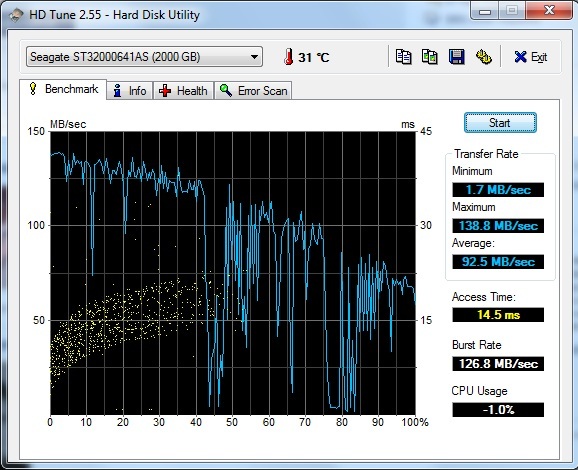
This test shows us much the same information that can be gleaned from the previous tests, but none the less its presented in a easy to read format. The biggest thing to take away from this test is the access time… 14.5ms is pretty long in the HD world.
 |
Windows Copy handler
To perform this test I took a 39GB image and transferred it to a SATA II drive which should have a theoretical bandwidth of 3GB/s
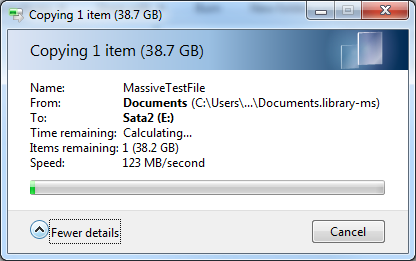 |
As a real world test moving large files I was very happy with a transfer rate of 123 MB with 2 SATA III drives I would expect a little higher transfer rate but not by much this drive is still limited by its spindle speed of 7200RPM.
Conclusion
It is clear that SATA III has a lot of potential but sadly we won’t being seeing that potential realized with mere 7200 RPM drives. The Seagate barracuda provides a valiant attempt at greatness but sadly is limited by the hardware in order to bypass some of that limitation I plan to attempt the use of the performance mod that our staff member Artiom demonstrated with the Seagate Barracuda 7200.11 ST31500341AS, if I am successful I will add additional results here. Overall the Barracuda XT will be a great upgrade for those who have older SATA II 7200RPM drives and plan to upgrade their motherboard with a SATA III supporting model such as the Asus P7P55D Premium. The overall speed increase over a current gen SATA II drive just doesn’t justify building a rig around the Barracuda XT. While I would recommend the Seagate Barracuda XT for someone looking to buy NOW I would still caution waiting to see what SSD’s come to market in the near future as well as what models and platforms become available in time with more mature chipsets, we would love to see a 10k RPM SATA III drive. It is awesome to finally see some real progress being made on what is the slowest component in most consumers machines, the hard drive.
Overall the Seagate Barracude XT gives us a look at what SATA II promises to consumers from Seagate in future drives and what we can hopefully look forward to. You can expect to start seeing adoption of SATA III from HD and motherboard manufacturers by Q4 of 2010 with motherboard manufacturers already begining implimentation of chipsets supporting these drives. Hard Drive manufacturers will be a bit slower on the uptake due to the stock of SATA II drives already in the channel and the lack of demand from consumers at this point in time. We congratulate Seagate for being on the forefront of SATA III and pushing forward with technology that will speed up everyones computing experience. So the question remains “What is the status of the other hard drive manufacturers in SATA III and why have they been so quiet?”

I salute you, I really enjoy the way in which u wrote the story?