Benchmarks
Test System
| Processor | Intel Core i5 2300 @ 2.8GHz |
| Memory | 16GB DDR3 @ 1600MT/sec |
| Operating system | Windows 7 Enterprise, Service Pack 1 |
| Motherboard | ASRock Z77 Extreme 6 |
| Storage | Crucial C300 256GB SSD |
These tests were conducted on a gigabit Ethernet network run over Category 6 cabling and mediated by a consumer grade gateway router, which is reviewed here (link to review of Engenius router). While this did not allow me to test some of the more advanced networking features, such as link aggregation, it is typical of the network environment you would find in a home office or small office.
The NAS was configured with a single Synology Hybrid RAID volume spanning both drives; the iSCSI target was configured to be a file-based, thin-provisioned volume on top of that.
CrystalDiskMark
This benchmark program doesn’t provide a lot of detailed numbers to pore over; it doesn’t take very long to run either, so it’s great for getting a quick and dirty profile of the drive’s—or in this case, the array’s—performance.
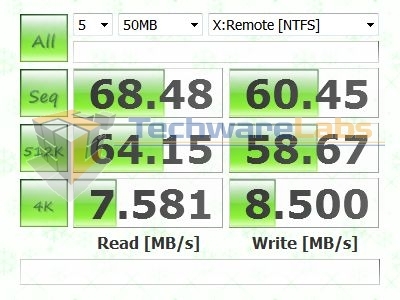
The performance numbers on the CIFS share are good, but not outstanding. Interestingly, the 4K random write speeds are just a little bit faster than the corresponding read speeds, though never by very much.
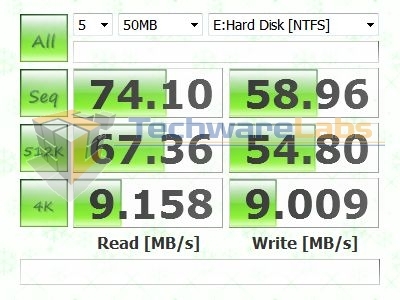
Running the same tests on the iSCSI LUN produced higher read speeds and lower write speeds; a difference to be sure, but not the unmitigated improvement I was expecting. The exception to this pattern was in the 4K tests again, which showed a marked improvement in read speeds and a marginal improvement in write speeds over the CIFS share.
Intel NAS Benchmark
The Intel NAS Benchmark program began its life as a profiling tool, and it shows. It provides no colorful graphs, nor any rankings. What it does provide, in abundance, is raw performance data under a variety of workloads. Here, we’ll be paring down a lot of the ancillary data and focusing on the throughput numbers, which are in all cases provided as MB/sec.
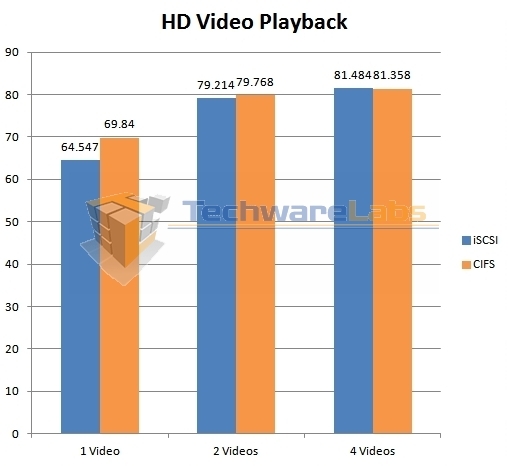
This set of benchmarks test the DS713+’s ability to stream HD video, one, two, and four videos at a time. Here the CIFS share enjoyed a slight lead in the one video test, though this all but vanishes once multiple streams are brought into play. Under this heavier load, the throughput stays in the vicinity of 80 MB/sec, which is more than sufficient for keeping multiple HD streams running.
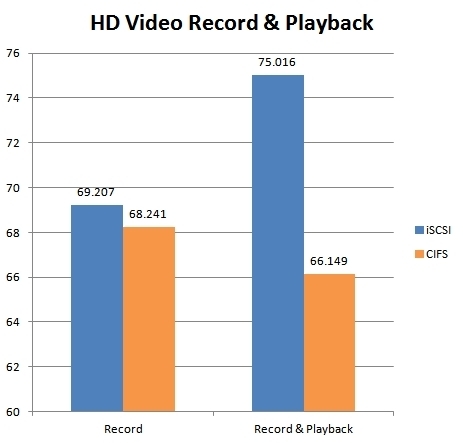
These benchmarks test the unit’s ability to record HD video streams with and without simultaneous playback, which is useful both for surveillance and for TiVo style media management from a live streaming source such as Twitch TV or a cable channel. The record-only test didn’t show much of a difference, but the simultaneous record-and-play test showed a gap of nearly 10 MB/sec between iSCSI and CIFS performance.
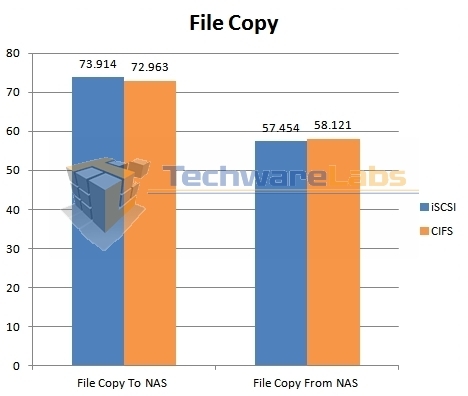
This pair of benchmarks utilizes a single 4 GB file, with a fairly large cluster size. Here, the differences are minimal at best. Strangely enough, the write operations (copy to) were faster than the read operations (copy from) by ~15 MB/sec, despite being large enough to overcome any RAM-based write cache on the NAS.
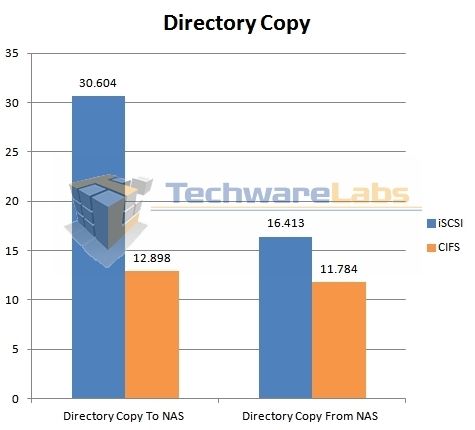
This benchmark, which transfers about 188 MB of data spread across 126 files, is where the differences started becoming more apparent. In the write test (copy to), the iSCSI share got more than double the performance of the CIFS share, while the read test came in with the iSCSI share showing a ~33% lead.
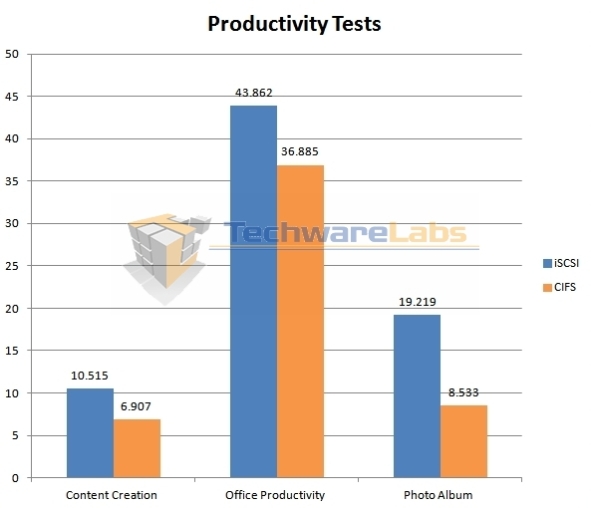
These benchmarks represent use of the DS713+ as a repository for files that are actively being worked on. The content creation bench is perhaps the most punishing of the three, consisting of rapid-fire, random access patterns that are ~95% discontiguous write operations. Office productivity measures, as you might expect, performance in a scenario where moderately-sized document files are being read and written at irregular intervals, with the whole file being processed at once. Photo album is similar to office productivity, save that the files are both smaller and more numerous, such as you’d find in a photo folder full of JPEG files. In all three cases, the iSCSI share showed a significant improvement in performance over the CIFS share, though as you’d expect, performance degrades in even the best case as reads and writes get more frequent and less contiguous.
TeraCopy
In a nod to more “real world” usage, I used TeraCopy to shuttle a couple of directories back and forth between the DS713+ and a client machine.
 |
 |
 |
 |
The first directory contained an install of the latest Ruby for Windows, which split 55 MB across ~2200 files. The read throughput was about 3.66 MB/sec for the CIFS share and 5.0 MB/sec for the iSCSI LUN. The difference in write performance was rather more pronounced, with the CIFS share managing about 1.53 MB/sec and the iSCSI LUN managing about 5.0 MB/sec.
 |
 |
 |
 |
The second directory contained several large HD movies, which split 11.95 GB across 15 files. The difference in read performance was negligible, with the CIFS share and iSCSI LUN managing 53.44 MB/sec and 57.18 MB/sec respectively. The write performance is where the problem showed up, with the CIFS share only managing an effective throughput of 5.06 MB/sec, while the iSCSI LUN maintained a much more respectable 63.07 MB/sec. These results were borne out with the default Windows file copy handler as well; I used TeraCopy mainly for recording total transfer times.

Ah, this is so important to me.. hope to have one real soon..