
Introduction –
Over-clocking, Tweaking, and Optimizing, are just a few terms used by PC users whom TechwareLabs list as Extreme Gamers or those who are not just looking to get a standard system, but are the ones who are willing to tweak their systems and get every last drop of performance. For those select individuals ASUS has built a motherboard like nothing that has been released to date. The ASUS M4A79 Deluxe is an over-clocker’s dream when it comes to selecting processor, RAM, DRAM, North and South bridge voltages. Now, this may not surprise most of us who over-clock our systems, but how you select what the settings are is very suprising. The ASUS M4A79 deluxe allows you to manually enter the voltage for every line item listed so far and more using what they call “Step-less Frequency Selection.” Prior to this all the options included choosing predefined range of voltages and settings which was very limited and could only be adjusted in some cases by .25Volt or greater increments. Taking it a little further, we have those motherboards which only have an option for just “Optimize,” which is some predefined setting that was specified by the manufacturer with the processor, and video card of the month at the time the motherboard was just a prototype. Essentially Asus has taken us from a hole in the wall resturant with a 2 page menu to a full buffet with enough choices for even the pickiest of eaters. So, since I have your attention, let us take a good look at the ASUS M4A79 Deluxe.
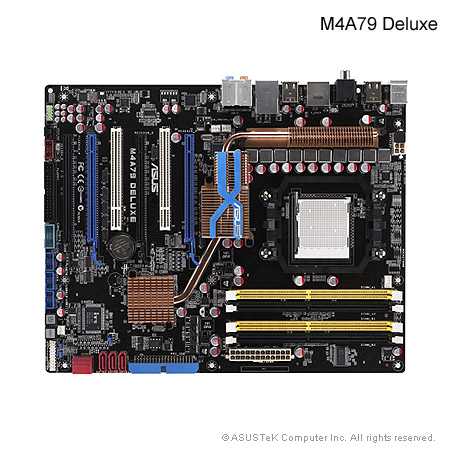
Specifications –
| CPU | AMD AM3/AM2+/AM2 ;Phenom™II/Athlon™II/Phenom™/Athlon™/Sempron™ Processors AMD 140W CPU Support AMD Cool ‘n’ Quiet™ Technology Support 45nm Phenom™ II CPU |
| Chipset | AMD 790FX/SB750 |
| System Bus | Up to 5200 MT/s HyperTransport™ 3.0 interface for AM3 / AM2+ CPU 2000 / 1600 MT/s for AM2 CPU |
| Memory | 4 x DIMM, Max. 16 GB, DDR2 1300(O.C.)/1200(O.C.)/1066*/800/667 ECC,Non-ECC,Un-buffered Memory Dual Channel memory architecture *Due to AMD CPU limitation, DDR2 1066 is supported by AM2+ / AM3 CPU for one DIMM per channel only. Refer to www.asus.com for the memory QVL (Qualified Vendors Lists). **Due to OS limitation, when installing total memory of 4GB capacity or more, Windows® 32-bit operation system may only recognize less than 3GB. Hence, a total installed memory of less than 3GB is recommended. |
| Expansion Slots | 4 x PCIe 2.0 x16 slots, support ATI CrossFireX™ technology (@ dual x16, triple x16 / x8 / x8, or quad x8 link) 2 x PCI 2.2 |
| Storage | SB750 Chipset 1 x UltraDMA 133/100/66 for up to 2 PATA devices5 x SATA 3 Gb/s ports Support RAID 0,1,5,10,JBOD 1 x eSATA 3Gb/s port |
| LAN | Realtek® 8112 Gigabit LAN controller featuring AI NET 2 |
| Audio | Realtek® ALC1200 8 -Channel High Definition Audio CODEC ASUS Noise Filtering Supports Jack-Detection, Multi-Streaming, and Front Panel Jack-Retasking Coaxial / Optical S/PDIF Out ports at back I/O |
| IEEE 1394 | VIA® VT6315N controller supports 2 x 1394a ports (1 at mid-board; 1 at back panel) |
| USB | 12 xUSB 2.0 ports (6 ports at mid-board, 6 ports at back panel) |
| Back Panel I/O Ports | 1 x PS/2 keyboard port (Purple) 1 x PS/2 mouse port (Green) 1 x S/PDIF Out port (Coaxial) 1 x S/PDIF Out port (Optical) 1 x External SATA port 1 x IEEE1394a port 1 x LAN (RJ45) port 6 x USB 2.0/1.1 ports 8-channel Audio I/O ports |
| Internal I/O Connectors | 3 x USB connectors support additional 6 USB ports 1 x Floppy disk drive connector 1 x IDE connector 5 x SATA connectors 1 x IEEE 1394a connector 1 x CPU Fan connector 1 x Power Fan connector 1 x COM connector Front panel audio connector Chassis Intrusion connector 2 x Chassis Fan connectors 1 x S/PDIF Out header CD audio in 24-pin ATX Power connector System Panel (Q-Connector) 8-pin ATX 12V Power connector 1 x Power on Switch 1 x Reset Switch |
| BIOS | 8 Mb Flash ROM AMI BIOS, PnP, DMI 2.0, SM BIOS 2.5, ACPI 2.0a, ASUS EZ Flash 2, ASUS CrashFree BIOS 2 |
| Manageability | WOL by PME, WOR by PME, WOR by Ring, Chasis Intrusion, PXE |
| Accessories | 2 x ASUS CrossFire bridge cables 1 x Ultra DMA 133/100/66 cable 5 x Serial ATA cables 1 x Q-Shield 1 x User’s manual 1 x Multi-functional module (1-port IEEE 1394a + 2-port USB2.0) 1 x 2 in 1 Q-connector (USB, System panel; Retail version only) *The floppy disk drive cable is purchased separately. |
| Support Disc | Drivers Express Gate ASUS PC Probe II ASUS Update ASUS AI Suite AMD OverDrive Utility (AOD) Anti-virus software (OEM version) |
| Form Factor | ATX Form Factor 12 inch x 9.6 inch ( 30.5 cm x 24.4 cm ) |
Specification list from Asus’ website Here
What is important to note here is that the ASUS M4A79 deluxe looks to be designed and targeted towards both gamers and overclockers. Of course many gamers are overclockers seeking to squeeze out the most performance from their rig so this makes sense. Why do we think its targeted towards gamers and overclockers? Lets look at the features: 4 PCIe 2.0 slots, 12 USB 2.0 ports, 8 channel audio, and as you will see below the ram voltage has 36 different settings. Now this is of course in addition to a host of additional features which all lend themselves to gaming and overclocking. The ASUS M4A79 deluxe is an AMD chipset board using the latest AMD CPU’s which as you are certainly aware have ben shown to be amazing overclockers hitting 5 GHz and greater.
Specifications Continued –
The specifactions listed so far are what one would expect from a motherboard with morethan a little extra, but the following unique features are what make the ASUS M4A79 Deluxe standout from other motherboards on the market today read on.
| ASUS Unique Features | ASUS Power Solutions: – 8+2 Phase Power Design – ASUS Anti-Surge Protection ASUS Green Design: – EPU *ASUS EPU is supported by AM2+/AM3 CPU only. – ASUS AI Nap Express Gate ASUS Quiet Thermal Solutions: – ASUS Fanless Design: Heat pipe solution – ASUS Fanless Design: Stack Cool 2 – ASUS Q-Fan 2 ASUS EZ DIY: – ASUS Q-Shield – ASUS Q-Connector – ASUS O.C. Profile – ASUS CrashFree BIOS 2 – ASUS EZ Flash 2 – Onboard Switch |
| Overclocking Features | Intelligent overclocking tools: – AI Overclocking (Intelligent CPU Frequency Tuner) – TurboV – Turbo Key Precision Tweaker 2: – vCore: Adjustable CPU voltage at 0.0125V increment – vChipset (NB): 16-step Chipset voltage control – vDIMM: 36-step DRAM voltage control SFS (Stepless Frequency Selection) – FSB tuning from 200MHz up to 600MHz at 1MHz increment – PCI Express frequency tuning from 100MHz up to 150MHz at 1MHz increment Overclocking Protection: – ASUS C.P.R. (CPU Parameter Recall) |
| Special Features | 100% High-quality Japan-made Conductive Polymer Capacitors! (5000hrs VRM, over 57 years operation lifespan at 65°C) ASUS MyLogo 2 AMD® OverDrive Support* *Advanced cooling system is required when advanced overclocking functions of AMD OverDrive are enabled. |
Now if those unique and Overclocking features haven’t convinced you to click on over to your favorite motherboard reseller, read on, by the time you finish this review, we are pretty sure you’ll have one on order very soon. The M4A79 Deluxe is packed full of more unique features that any other motherboard TechwareLabs has ever covered to date. We will be covering just a few of what is listed above to highlight The M4A79 Deluxe is setup with a heat pipe setup to assist with disapating the heat from the chipset while under load while gaming (a.k.a. heavy processing loads).
Motherboard Design and Layout
|
|
|
| When you get the M4A79 Deluxe you are not “just” getting the best motherboard and a manual, you are also getting SATA cables, SLI jumpers, USB port to fit in a perpheral gate. | The I/O panel is not just the run of the mill stamped out piece of metal but a re-engineered plate with ASUS’ which incorpates static electricity resistant material to assist with the protecting your motherboard from EMF interferance. |
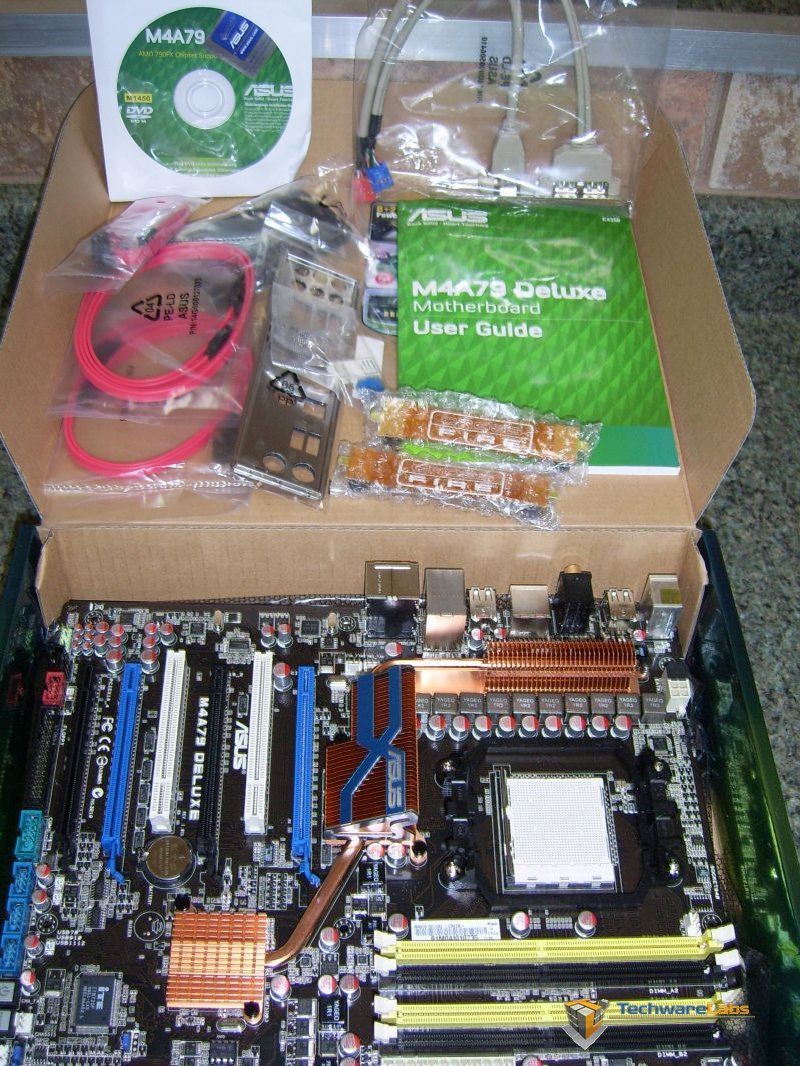
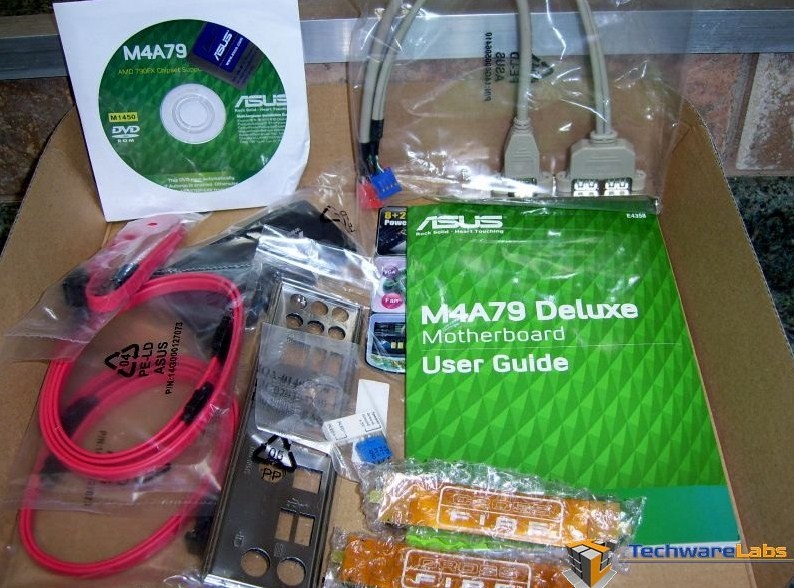
ASUS has thrown in a few extras which more than likely would be those things you would go and purchase in addition to a high-end motherboard, which essentially saves you the trouble of order extra parts.
|
|
|
| The heat pipe on the M4A79 Deluxe is a real eye catcher. | Connecting to both the North and South Bridge this heat sink is not just here for looks. |
The heatpipe configuration covers both the North and South bridge which is an engineering spot of genius. The Northbridge is covered with some small veins to assist a little with heat disipation which is connected to a significant heat sink. The South bridge also has its own small vien configuration and is also connected to the larger heatsink through a heatpipe. Since there is a heatpipe connected to the South Bridge the heat sink sitting on the South Bridge can keep a low profile which assists with the installation of multiple high-end graphics cards which is were other motherboard come up short. Other motherboards designed for performance have a small South Bridge fan that alwasys gets in the way of even one graphics card.
|
|
|
|
Looking at the back side of the main heatsink for both the North and South Bridge. |
A closer look at the North Bridge |
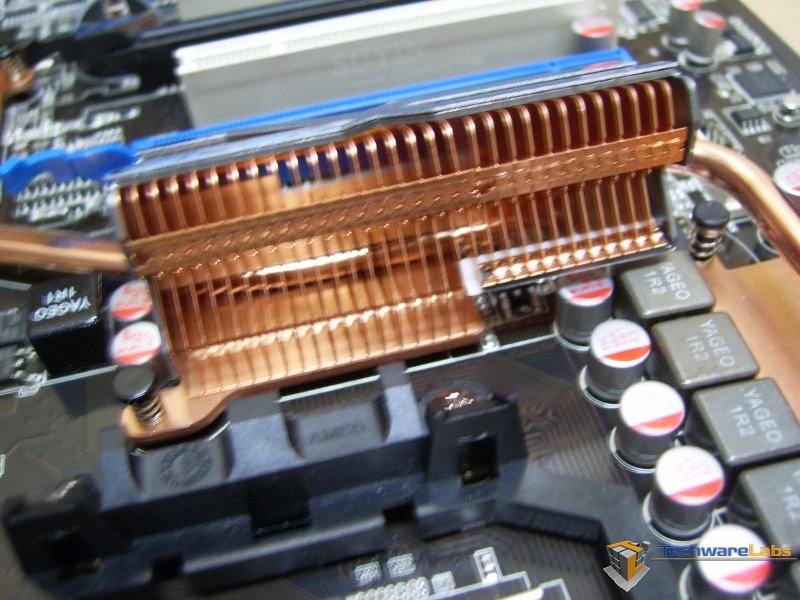
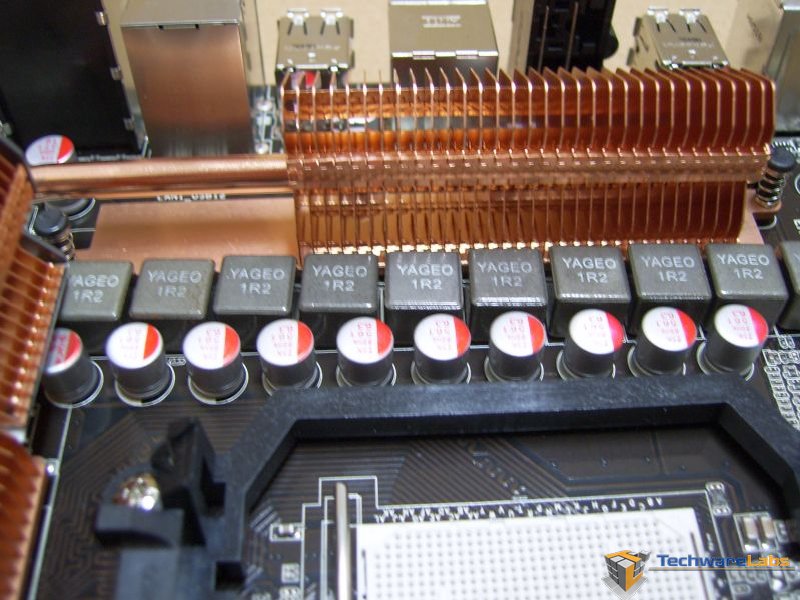
Taking a look at the backside of the main heat sink we can see that heat disipation is unobstructed. The right photo is a close up of the heat pipe setup on the NorthBridge and a close up of the featured “100% High-quality Japan-made Conductive Polymer Capacitors! (VRM 5000hrs lifespan @105°C, 500,000hrs @65°C)”
Motherboard Layout Continued –
|
|
|
| No Shortage of USB ports here. A total of 12 USB 2.0 ports ! | The SATA ports are configured in a three vertical and two ports at 90 degrees to assist with a cleaner cable management look. |
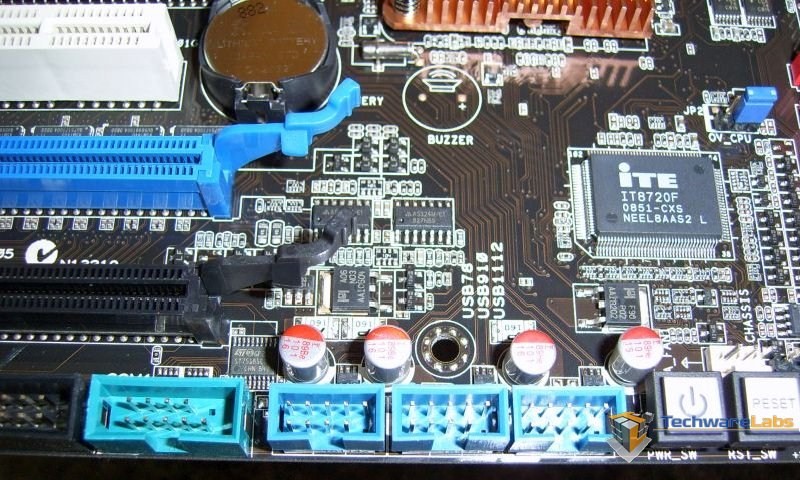
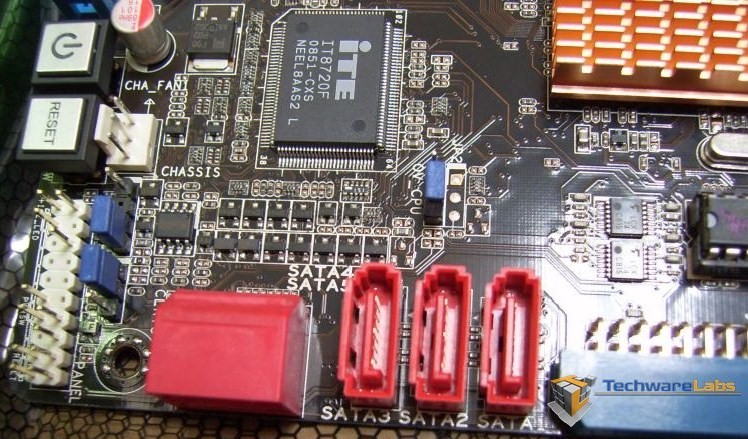
Having a number of USB ports is nothing new to high-end motherboards but having two SATA ports at 90 Degrees is something ASUS has just recently added to their motherboards which assist with a cleaner looking cable management where you don’t have to bend your SATA ribbons too sharply off the motherboard in order to route the cables around the back of the motherboard.
|
|
|
| 4 DIMM slots which supports the DDR2 1300 O.C. | Additional features shown here on the sticker covering the DIMM slots from the factory displays the 8+2 Phase Power Design, Energy Processing Unit (EPU), and TubroV ability. |
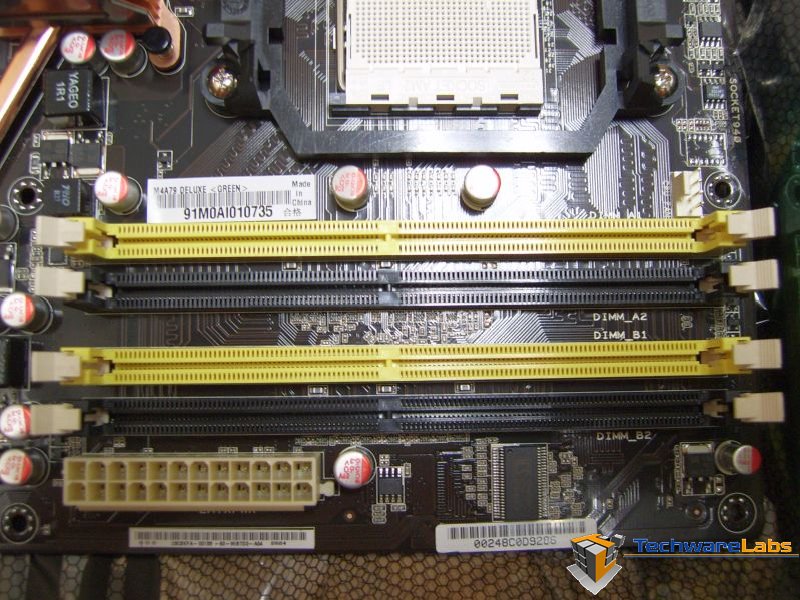

Such features as the Energy Processing Unit, and 8 + 2 Power Management are integrated to assist your motherboard with affectively using or not using energy in the most effective way to give you a gaming experience not seen from any other motherboard on the market today
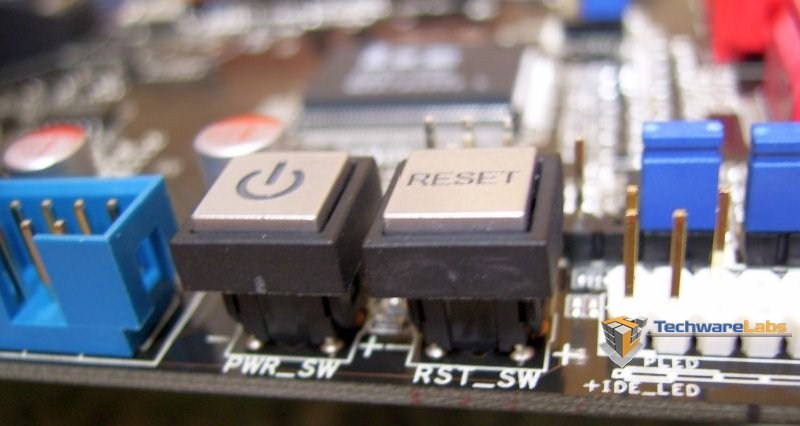
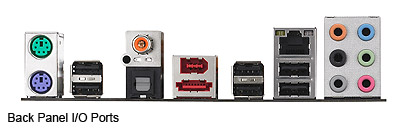
The onboard Power and reset buttons is pretty inventive and pretty handy if/when your still in your rig configuring different settings, but once the side panel is installed on the case these buttons are just for show. The I/O panel is also not short of options when it comes to options for audio and USB ports (not including the USB ports shown in a previous photo.
Installation and BIOS
|
|
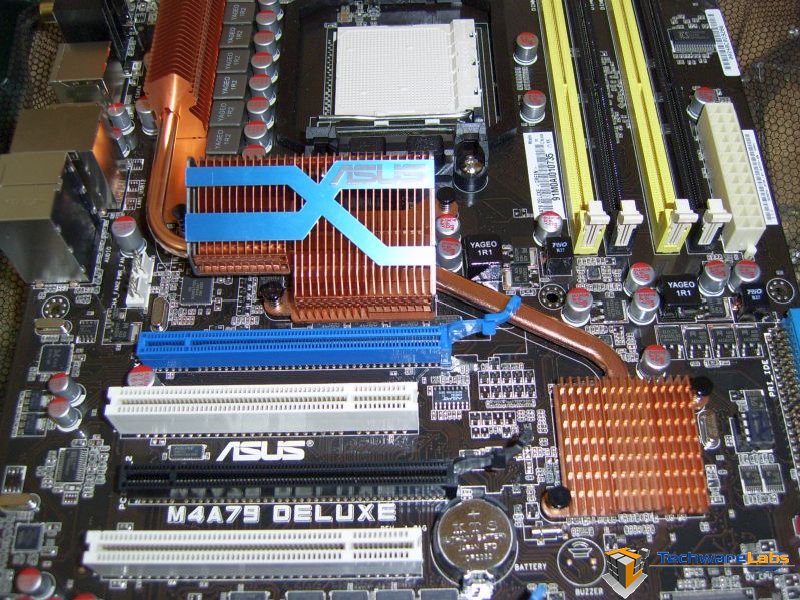 |
| Installation of the board in the Cooler Master HAF 932 case was very easy. | Another look at the heat pipe layout of the board. |
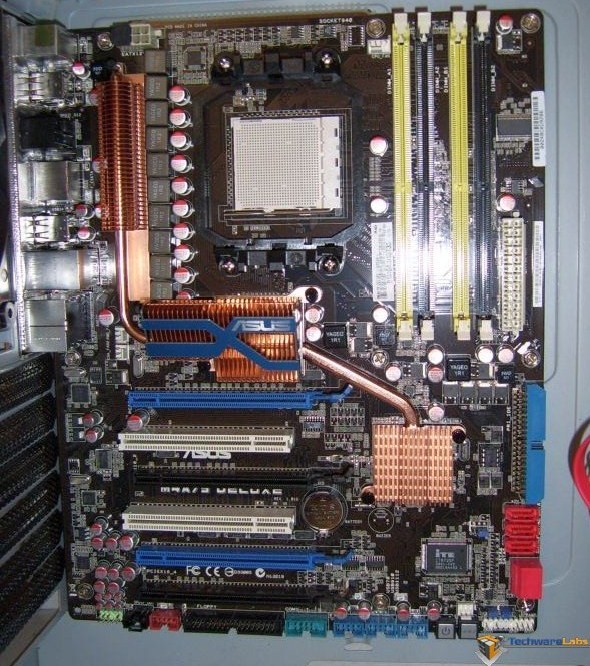
Some of the features you won’t notice by simply looking at the motherboard would be the “Stack 2 Cool,” which assist with keeping components cooler. “ASUS Stack Cool 2 is a fan-less and zero-noise cooling solution that lowers the temperature of critical heat generating components. The motherboard uses a special design on the printed circuit board (PCB) to dissipate heat these critical components generate.” Also “ASUS Q-Fan2 technology intelligently adjusts both CPU fan and chassis fan speeds according to system loading to ensure quiet, cool and efficient operation.” Both of which the user wouldn’t know is there and working to keep the system running at it best in heavy loads and at idle
 |
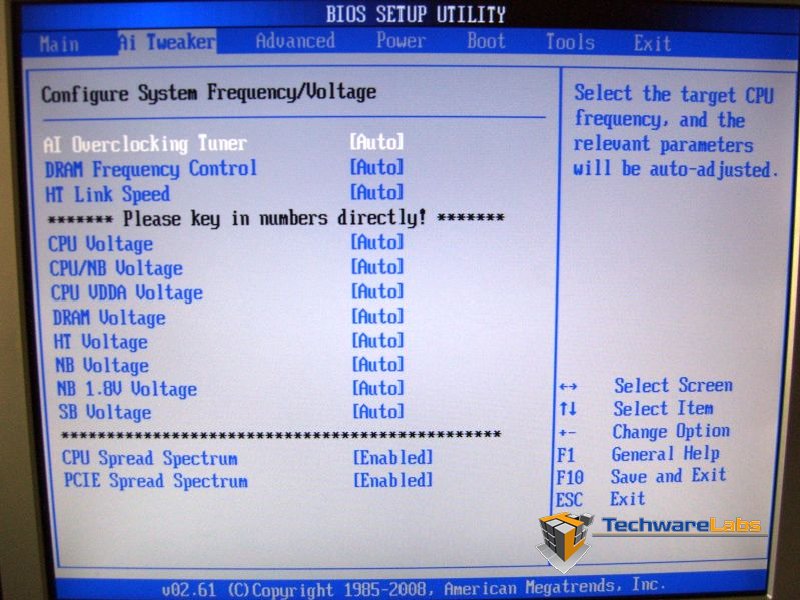 |
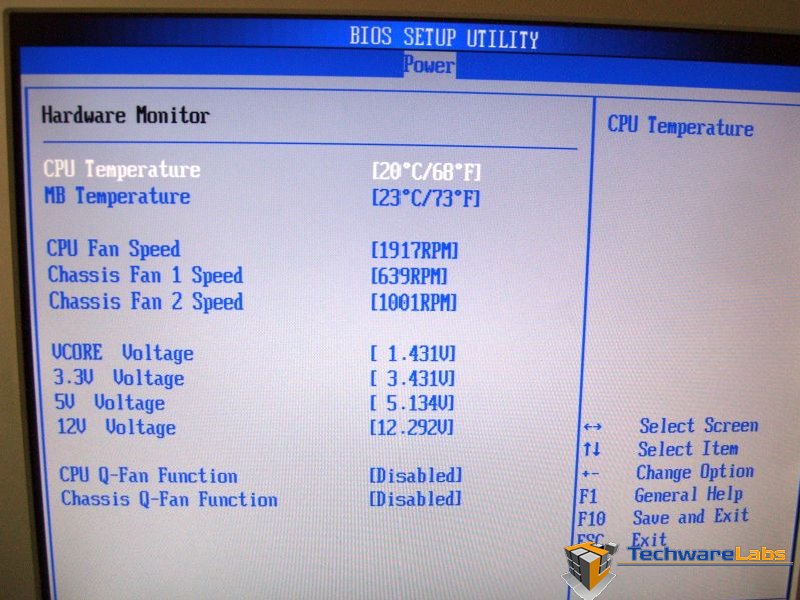
| Going through the different BIOS screens can be seen as a overwhelming with options that can be set manually for just about everything. | When it came to the voltage screen for setting the voltages for the processor and the ability to change the voltages by simply typing in the voltage you want rather than toggleing through a list, one can spend hours even days tweaking their system in order squeeze just a little more from their system |
The BIOS and it numerous settings can become a little too much for the over-clocking beginner, but is a tool worth working with to gain the most from your system’s processor and peripherals.
Conclusion –
The ability to over clock your processors, RAM, and graphics cards given a few bios settings or a pre-programmed “Optimized” setting just isn’t enough for the present day extreme PC user. Using voltage settings which are stepped at a .25volts jumps are just too great and there are often too few voltages to choose from (too low and the board won’t work, too much and you risk burning up your processor, RAM or Graphics card if your not careful. The ASUS M4A79 Deluxe doesn’t have a safe guard built in to prevent you from burning up your processor, RAM, or graphics card, but it does have the ability to granularly increase/decrease voltages at a .0125volts adjustments which allows you to find the right voltage for all the peripherals your rig holds today and tomorrow. So, if your a gamer looking for your next motherboard and would like to get into overclocking the ASUS M4A79 Deluxe has plenty of tools to assist you with optimizing your system. If you’re an extreme PC system user and are looking for a new motherboard which provides you the ability to tweak to the Nth degree, you should really take a close look at the ASUS M4A79 Deluxe for your next rig. We feel the ASUS M4A79 Deluxe deserves the Awesome Hardware award for design an implimentation geared towards the highest in performance for the most demanding users all the way to the casual consumer.