Testing
Now that the set up is complete,
I ran benchmarks on the Barracuda 7200.11 across two different sizes: 819 GB and 300 GB. Both tests were extremely impressive and demonstrated performance marks which greatly surpassed any drive in its class. Without further adieu I present you the results.
Barracuda 7200.11 @ 300 GB Vs Velociraptor
Crystal Disk Mark 2.1
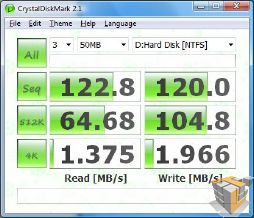
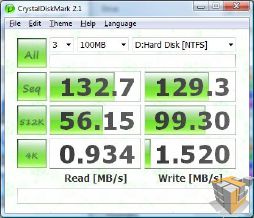
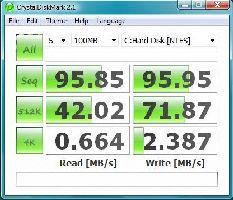
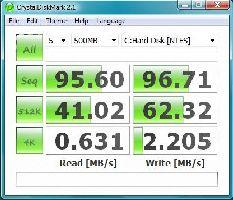
This particular software measures the speeds of random and sequential reads and writes across a section of the drive and outputs the average result. There is a total of 4 section consisting of 50 MB, 100 MB, 500 MB, and 1000 MB across which the program reads or writes.
|
CrystaDiskMark 2.1 50 MB Test
|
|
 |
 |
|
Barracuda 7200.11 @ 300 GB |
Velociraptor |
|
CrystaDiskMark 2.1 100 MB Test
|
|
 |
 |
|
Barracuda 7200.11 @ 300 GB |
Velociraptor |
|
CrystaDiskMark 2.1 500 MB Test
|
|
 |
 |
|
Barracuda 7200.11 @ 300 GB |
Velociraptor |
|
CrystaDiskMark 2.1 1000 MB Test
|
|
 |
 |
|
Barracuda 7200.11 @ 300 GB |
Velociraptor |
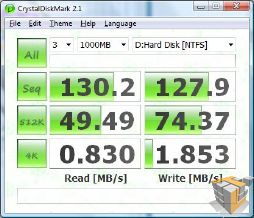
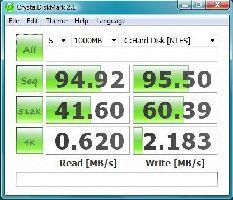
The Seagate Barracuda 7200.11 left the Velociraptor in the dust by outperforming it in essentially all the categories of comparison with the exception of the 4K random write. The reason why the Velociraptor is better than the Barracuda in this particular test is generally due to Velociraptor’s lower access times, however if you de fragment your drive or the data which you read or write is sequential (most of the time it is) then the Barracuda definitely wins this one.


Perhaps someone, preferably an everyday computer user, with this type of hard drive could try the hack and let us know how it performs. If I had one I would give a whirl. In my opinion it would be worth it up to the point of being full, then you could always move on to the 819 GB setup.
Thanks for the review Artiom.
Chris: “while partitioning the drive does allow similar effect, it is not the same”
Yeah, it’s not the same… it’s something that actually has some sense in it, unlike capacity clipping HDD on firmware level.
___
Chris: “If you do have it partitioned, anything accessed on the 1 partition would be the fastest, however if you try and access anything on the other partition at the same time, the performance would drop significantly”
Yeah… which is why you would install OS and all applications on same partition, and leave the second partition for stuff like movies, mp3s, OS back-up images… stuff that you don’t need to load while booting OS or load heavy applications.
___
Chris: “Saying that you won’t access the second partition whenever you want to use the first isn’t really practical either”
Eh… on the contrary, if you for example store HDTV movies, and other rarely used, very big files to the remaining 1.2 terabytes of space, you really don’t need to read those files while booting OS, loading WoW or basically doing anything else than watching them (and watching them is done by loading a small non-bloated application like Media Player Classic).
Really, I see absolutely no damage in using the leftover space for stuff that is rarely accessed.
This “hack” is the most bafflingly idiotic hack I’ve ever read. It’s a very bad variant of a VERY old partitioning hack.
___
Artiom: “This means that there is no guarantee that all of the LBAs are going to be on the inside of the drive which is what gives it the boost it needs.”
Except the inner tracks are the slowest. rpm is same on inner and outer diameter, but on outer diameter, the circumference is bigger, thus more bits travel below the R/W head in a time interval.
can this hack be done on other drivers from seatgate maybe like the 1T version….?
Yes performance, yes cheap price. What about reliability? This is often overlooked. I’ve had nothing but trouble with seagate drives. I would rather spend a bit more for quality/reliability.
Why downsized the 1.5tb offering ?
Just buy the 320gb version ?
http://www.seagate.com/ww/v/index.jsp?locale=en-US&name=st3320613as-barracuda-7200-11-sata-320g-hd&vgnextoid=e7c048e03b758110VgnVCM100000f5ee0a0aRCRD&vgnextchannel=47f281f8c0f43110VgnVCM100000f5ee0a0aRCRD&reqPage=Model
Actually my experience is exactly the opposite. Seagate drives have time and again proven themselves much more reliable than most of the competition. I recommend either Western Digital or Seagate to everyone.
I, on the other hand, recommend everyone stay way from WD and Seagate and heavily favor Hitachi and Samsung.
(OK, WD has gotten its act together, but I still won’t ever forgive them for the _8_ (yeah, 8) RMAs he had to go through…started with a 20gb and ended up with a 120gb, all failing in a 6 month period. Oh, and the 50% WD RMA rate at our shop… ugh)
getting more for less is what it’s all about. That’s why we overclock.
So, for the price of 1 Velo, i could buy two of these and RAID 0 them. I’m assuming a RAID 0 of these would destroy a single Velo, for the same price as that single Velo?
This is a rather misleading article. There is no way that you can simply ignore the superior seek time of the Velociraptor and just dismiss it as a minor difference. It’s the seek time of the velociraptor which makes it so desirable, not the sustained transfer rate. The seek time is what reduces stuttering in games for example, sustained transfer rate just makes things like defragmenting the drive faster.
The problem with just partitioning the drive is that windows does it dynamically. This means that there is no guarantee that all of the LBAs are going to be on the inside of the drive which is what gives it the boost it needs.
I have learned that The outside of the drive is the fastest.
There is no benefit in making the rest of the disk invisible. Partitioning the drive does exactly the same thing. This tecnique is old, and I’ve seen reviews on several other sites (tom’s hardware being the first that comes to mind).
Think about it, while partitioning the drive does allow similar effect, it is not the same. If you do have it partitioned, anything accessed on the 1 partition would be the fastest, however if you try and access anything on the other partition at the same time, the performance would drop significantly as the drive’s head has to move to the other sectors on the second partition and then back to the first. So in fact partitioning it in two would not have the same effect as this method if you plan on actually using the remaining space. Saying that you won’t access the second partition whenever you want to use the first isn’t really practical either.
Instead of changing the LBA value, all you have to do is partition the drive to use the first 300gb or whatever you want for your system drive. There is NO benefit in making the rest of the drive invisible. You could still be using the remaining 1.1~1.2 tb for data.
Well Captain Obvious, you should know that there IS a difference. and as Captain Obvious, you should have found this:
http://enterprise.media.seagate.com/2009/07/inside-it-storage/the-fastest-gaming-drive-alive-barracuda-7200/
Apparently, even Seagate agrees 🙁
where IS the difference?
I wonder if this trick would work on a Seagate’s FreeAgent 1.5 TB External hard drive?
Even if you could do it (I don’t believe you can) you would still be horribly bottlenecked by the USB 2.0 connection. It doesn’t look like the FreeAgent line have an eSata connection, which is what would be required to see any benefit from this hack.
It’s not a USB drive. You’re looking at an ad listing a usb drive for sale.
LOL what`s the point making this on externall hdd? when USB can`t handle even close performance to S-ata. Or Do you have Firewire B rack?