The Western Digital TV Media Player
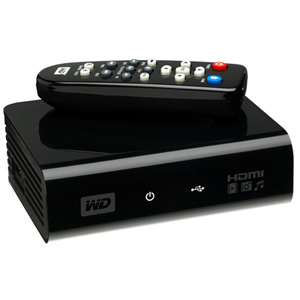
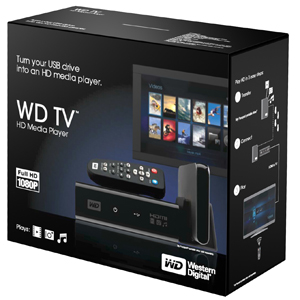
The Western Digital TV HD Media Player (WDTV) is the device everyone has been raving about. I first heard of the WDTV from a friend who got me pretty excited about its possibilities. When I got my hands on it, I’ll admit I was a little skeptical based on first looks. My first thoughts were how could such a small device ( About the same size as a Western Digital My book) lacking most of the normal internal components that are normally found on media centers as well as having half the power footprint, bring real USB driven content to the masses? My other concern was, how well could this device really compete against a true media center? Will I be disappointed? Find out as I review this latest offering from Western Digital.
 |
 |
What is it exactly?
Western digital describes it as a “High-definition multi-media adapter”
In lamens terms it is a device to play just about any type of media you may have (pictures, music, video), directly from a USB thumb drive or portable hard drive, the WDTV sports 2 USB ports to allow you to play media from both sources very easily supporting the NTFS, FAT32, (Windows) HFS+ (Mac) file systems (sorry no journaling support and no EXT support, sorry linux fans) sadly it also does not boast either Firewire or Ethernet capability. The general idea around the device appears to be plug in a USB stick or portable HD, select the media with the included remote and easy to use menus and you’re off.

Specs:
| File Formats supported: | |
| Music – MP3, WMA, OGG, WAV/PCM/LPCM, AAC, FLAC, Dolby Digital, AIF/AIFF, MKA | |
| Photo – JPEG, GIF, TIF/TIFF, BMP, PNG (sorry no RAW format used by high end cameras) | |
| Video -MPEG1/2/4, WMV9, AVI (MPEG4, Xvid, AVC), H.264, MKV, MOV (MPEG4, H.264), MTS, TP, TS (these are your primary file types that you will find most downloaded as files as well as most archived video) |
|
| Playlist – PLS, M3U, WPL | |
| Subtitle -SRT (UTF-8), SMI, SUB, ASS, SSA | |
| Note: – MPEG2/4, H.264, and WMV9 supports up to 1920x1080p 24fps, 1920x1080i 30fps, 1280x720p 60fps resolution – An audio receiver is required for surround sound output. AAC/Dolby Digital decodes in 2 channel output only – JPEG does not support CMYK or loss less. – BMP supports uncompressed format only. – TIF/TIFF supports single layer only. |
|
| File Formats Not Supported | |
| Does not support protected premium content such as movies or music from the iTunes® Store, Cinema Now, Movielink®, Amazon Unbox™, and Vongo® | |
| External Drive Formats Supported | |
| FAT32, NTFS, HFS+ (no journaling and no Ext support sorry linux users) | |
| Performance Specifications | |
| Serial Transfer Rate | |
| USB 2.0 | |
 Serial Bus Transfer Rate (USB 2.0) Serial Bus Transfer Rate (USB 2.0) |
480 Mb/s (Max) |
| Physical Specifications | ||
| Capacity |
N/A (your limited by the size drive you posess) | |
| Interface | HDMI, Composite A/V, USB 2.0 | |
| Physical Dimensions | |
| English | |
| Height | 1.57 Inches (40 mm) |
| Length | 3.94 Inches (100 mm) |
| Width | 4.94 Inches (125.5 mm) |
| Weight | 0.67 Pounds (303 g) |
| Environmental Specifications | |
| Temperature (English) | |
| Operating | 41° F to 95° F (5° C to 35° C) |
| Non-operating | -40° F to 149° F (-40° C to 65° C) |
| Electrical Specifications | |
| Current Requirements | |
| Power Dissipation | |
| AC Input Voltage |
100-240 VAC |
| AC Input Frequency |
50-60 Hz |
Whats important to note here is that the WD TV has both a small foot print as well as having a plethora of video options to satisfy most file types which should offer most users a very pleasureable experience.
Stay tuned after the break for a closer look at this Intriguing product.

1. I have a WD TV USB player. Problem: Some YouTube downloads in FLV format have time lags between video and audio. I therefore use my FLV Downloader’s conversion programme to convert the videos to MP4 – which shows no such time lags
2. Is there a machine which records TV onto USB sticks?
Is there a Hard disk in the Media Player?
I changed the video settings and now I get a “input not supported” message, how do I go back to the main menu to change it back? is there any “reset” settings button?
Thanks
can i hook this up with my ps3 and xbox 360??
Electro,
The player only supports USB based media in the WDTV’s stock firmware. I am aware that there has been a decent following in the community regarding modding the WDTV and supposedly there is firmware that will allow USB based CD drives. I have not heard of support for USB HD media players working.
Does the HD player supports for playing of movies from BlueRay disks?
The WDTV since I reviewed it has replaced my cable bill I download the shows I want to see copy them all over to an external HD and watch them in upscaled 1080p its awesome.