 Testing the Adrenaline was fairly simple. I did 3 runs of each task with just the hard drive installed, then I installed the Adrenaline with the Dataplex software and recorded 3 runs. In order to get maximum performance and the kind of numbers you could expect day in and day out, I would run each test 4-5 times before I recorded the times. This is because the caching software works by caching tasks that you perform frequently. For example, if you were to install the drive and boot Windows, it would be just as slow as a standard hard drive. But if you were to then reboot, the boot time would be much faster, and increasingly faster each time until it reaches max performance, which I found to be somewhere around the 3rd or 4th time.
Windows Startup
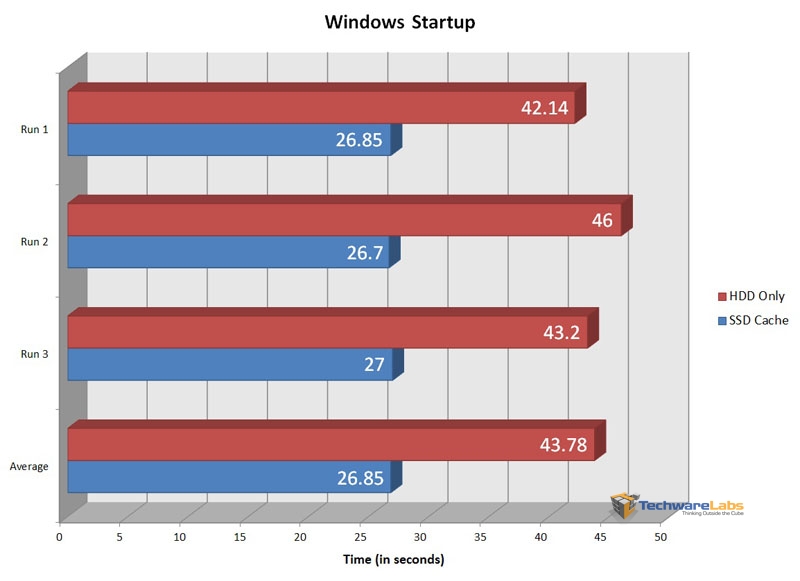 |
Windows boot time is the go to benchmark for any hard drive or SSD because it more than anything is what is going to make your computer feel fast. To do this test I simply hit the power button and measured how long it took to hit the desktop.
Here we see that the Adrenaline significantly decreased boot time from about 44 seconds to around 27 seconds. This difference is very noticeable and even more impressive when you consider that about 15 seconds of that is the motherboard running its checks.
Firefox
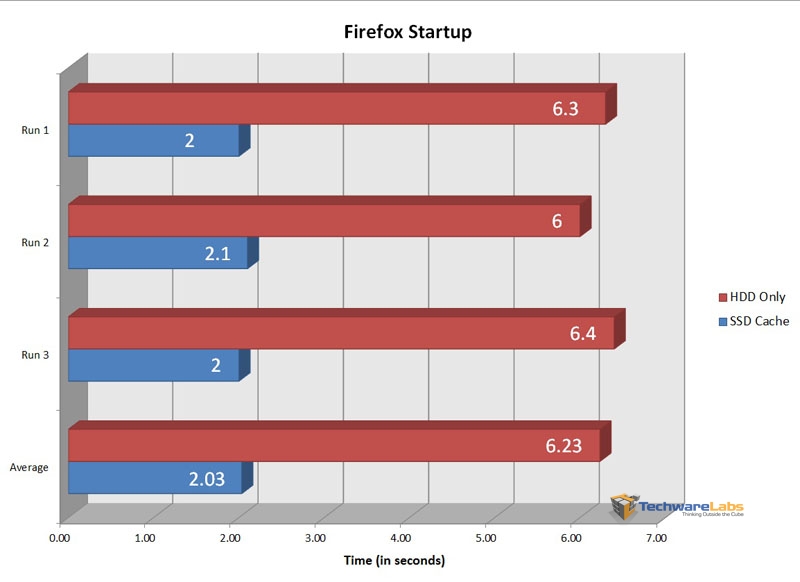 |
Once my computer is booted, generally the very first thing I do is open Firefox. Start up time for that went from 6.23 sec. to 2.03 sec. Keep in mind that this is the first start per boot as every time after that is going to be almost instant even with just a hard drive. While 4 seconds doesn’t sound like a lot, it really is the difference between seemingly slow and very quick.
CPU-Z
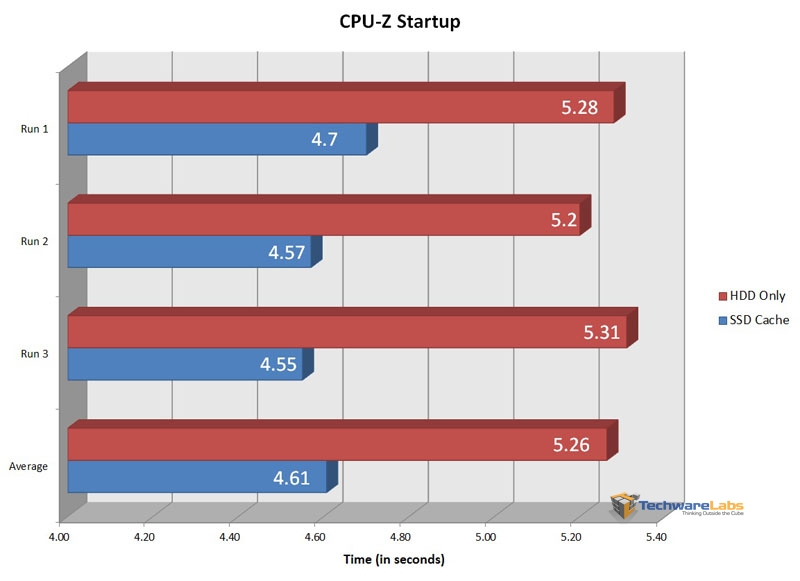 |
I thought I would try out CPU-Z start time because I felt that it would rely less on the hard drive so would be a good gauge for programs like it. As we see here, from clicking the icon to fully loaded was less than a second difference between the two setups as expected.
Photoshop CS5
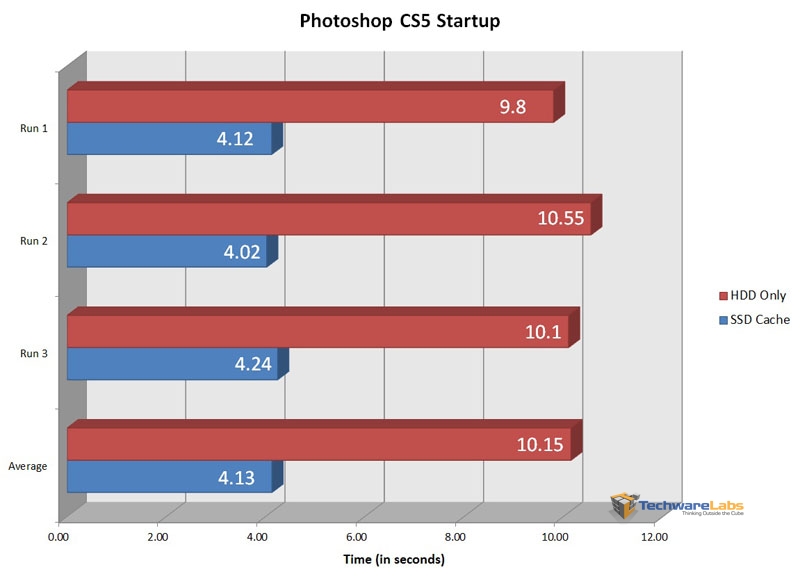 |
Photoshop start time is another classic benchmark for drives because it has to pull so much stored information. As expected, the Adrenaline made a massive difference, lowering start up from roughly 10 sec. to around 4.
Windows Media Player 12
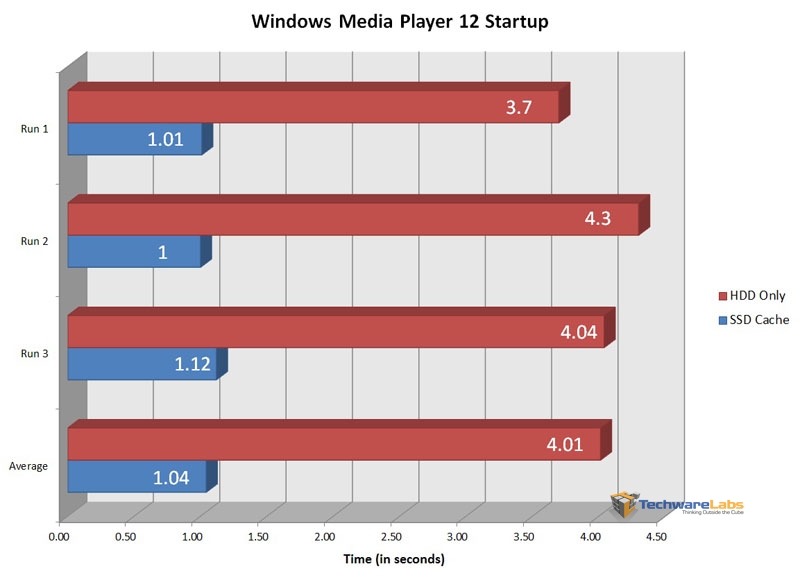 |
Windows Media Player boot time also fared much better with the cache drive, dropping from 4 seconds to just 1 second.

[…] Crucial Adrenaline Solid State Cache Review @ TechwareLabs […]
[…] me, and I had an excellent time. But now…back to work.TechwareLabs gets us started with the Crucial Adrenaline Solid State CacheBjorn3D taps away at the Corsair Vengeance K90 KeyboardTechReviewSource sits down with the Toshiba […]
[…] Crucial Adrenaline Solid State Cache Review @ TechwareLabs […]
[…] Crucial Adrenaline SSD @ HardwareHeaven Crucial Adrenaline SSD @ TechwareLabs OCZ Octane 512GB SSD @ Hardware […]
[…] a hard drive. Read on to find out if it will live up to its claim." Read the full review here. "Other girl's luxuries are my necessities, so buddy, […]
[…] Crucial Adrenaline Solid State Cache Review @ TechwareLabs […]
[…] Crucial Adrenaline Solid State Cache Review @ TechwareLabs […]