
Introduction
When configuring a new rig most people spend the most money and the most thought on their graphics card. After all, it’s pretty much the only thing running the games. You could spend all your money on an Intel i7 Extreme or a Phenom II 1100 and get some serious computing horsepower, but the best processor in the world isn’t going to do much in the way of gaming with an after thought of a graphics card. So, save your money and get a decent graphics card like this one, the Sapphire Vapor-X AMD Radeon 6770 1GB. It’s only $135, and if you were thinking about spending more than $200, two of these will scream. The Vapor-X part of the name refers to Sapphire’s cooling system and as a plus, the Vapor-X is over-clocked to differentiate it from the rest of them. The Sapphire Vapor-X AMD Radeon 6770 offers and 860MHz Core clock on a 40nm chip with 800 x stream processors. It’s also overclocked, but not by much. The stock speed from AMD is 850MHz (from what I was able to find online), but the Vapor-X cooling should all you to overclock to squeeze out some extra power.
The new 6700 series is based on the previous 5700 series and is the second generation to use the 40nm design and is mostly an optimization of the 5000 series. What that brings us is a faster and cooler card. Just like the 5000 series, we also get DirectX 11 to get most out of new games like Dirt 3. With DirectX 10.1, most of the new features can be done in DirectX 9 which is why many games still use DirectX9, but with DirectX11, Microsoft has added tessellation which allows for dynamic textures as well as other graphics improvements. DirectX 11 also brings GPGPU support for direct computations on the card and advanced multi-threading support so that developers can make their games go even faster on multi-core processors like this one. In the past, DirectX 10 wasn’t quite worth upgrading to especially since it required Windows Vista or greater, and many people still liked their snappy XP machine (even though their expensive multi-core processors weren’t fully supported). With DirectX 11 it really is worth the upgrade to Windows 7 (Windows 7 is worth it anyway. You XP users need to get with the times).
The Radeon 6770 also sports AMDs Eyefinity technology. This card will support up to 5 screens, though you will need a variety of adapters to plug them in. While this may sound like a great gaming experience, you might not want to use this card for games with all those screens. With each screen you are effectively doubling the number of pixels the card needs to render, so a faster card would be recommended. However, if you need all these screens for productivity, then buy away. This card also has a HDMI 1.4a port for 3D screens.

If you are looking for a good mid-range graphics card this just may be it. Check out what the the Sapphire Vapor-X HD AMD Radeon 6770 1GB GDD5 has in store for you after the break.

Closer Look
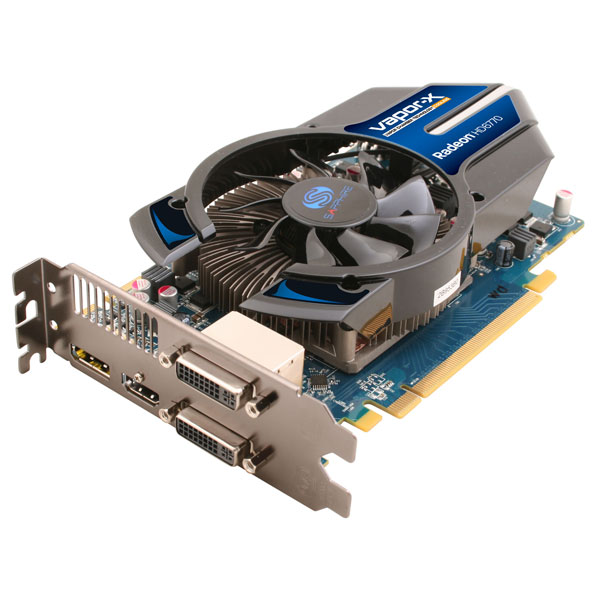
Here we have some un-boxing photos of the Sapphire Vapor-X AMD Radeon 6770. Inside we have an instruction manual, driver disc, DVI to VGA adaptor for those stuck in the 90s, a 6-pin to 4-pin power adapter in case you don’t have the necessary 4-pin connector on your power supply, and the card itself. This is a dual slot card, so make sure you have some available slots. Taking up the second slot we have a a large heatsink full of heatpipes. These should allow for ample cooling and provide for a decent overclock. On the I/O side we have two dual-link DVI ports, 1 DisplayPort, and 1 HDMI 1.4a port for a 3D monitor.


Specifications
| Specification | |
| Output | 2 x Dual-Link DVI 1 x HDMI 1.4a 1 x DisplayPort |
| GPU | 860 MHz Core Clock 40 nm Chip 800 x Stream Processors |
| Memory | 1024 MB Size 128 -bit GDDR5 4800 MHz Effective |
| Software | Driver CD 1 x Dirt®3 Coupon |
| Accessory | DVI to VGA Adapter 6 PIN to 4 PIN Power Cable |
Testing
Testing was done on the following machine:
Test Rig
| Motherboard | Gigabyte 890gpa-ud3h |
| CPU: | AMD Phenom II x6 1075T 3.0GHz |
| Heatsink | AeroFlow FX 120 |
| Power Supply | Cooler Master Silent Pro M 600W |
| RAM | 4GB OCZ Platinum 1600 |
| Case | Antec Six Hundred v2 |
| GPU | Sapphire Vapor-X HD AMD Radeon 6770 1GB |
| Hard drive | 1TB Western Digital Black |
I ran a combination of synthetic benchmarks and actual games for testing. I also ran Luxmark to test the OpenCL capabilities of this card. After testing I overclocked and ran a few of the same tests for comparison.
Benchmarks
3Dmark Vantage
“3DMark Vantage is a PC benchmark suite designed to test the DirectX10 performance of your graphics card. We’ve been making 3DMark for over 10 years, with each new edition using the latest 3D technology to determine real-world performance.
A 3DMark score is an overall measure of your system’s 3D gaming capabilities, based on comprehensive real-time 3D graphics and processor tests. By comparing your score with those submitted by millions of other gamers you can see how your gaming rig performs, making it easier to choose the most effective upgrades or finding other ways to optimize your system.
3DMark is widely used by the PC industry, press and media as well as individual users and gamers, for comparing performance levels between whole systems or even specific components.”
 |
| 3DMark Vantage |
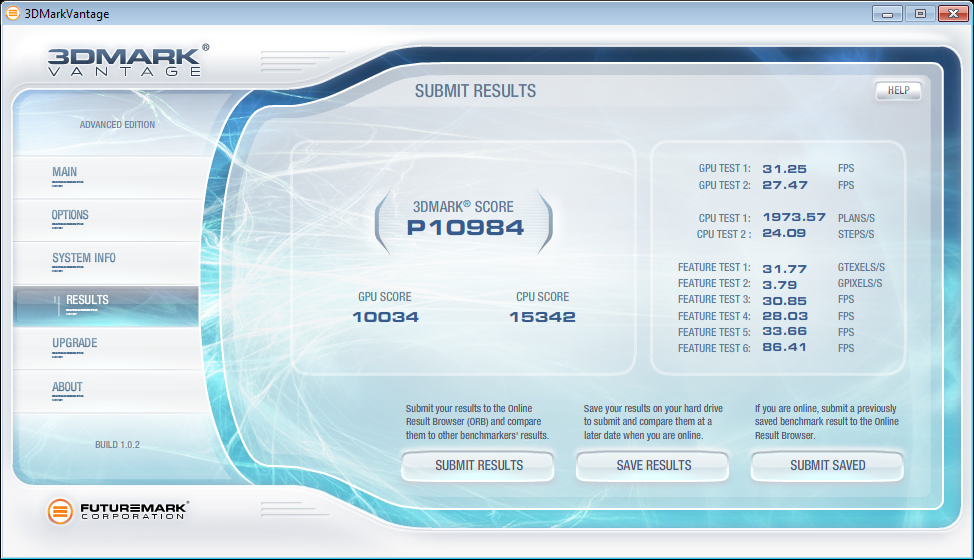
Total score is a whopping 10984! This is the first graphics card I’ve personally used that ran the first test at greater than 30fps. The 10034 GPU score is about 1500 more than the Nvidia Geforce GTS450 that I reviewed last fall.
3DMark 11
“Your PC’s performance is determined by the interactions between different hardware components, the operating system and the type and amount of software running. A benchmark provides a set of performance tests that can be repeated with a high degree of accuracy on a wide range of computer hardware.
3DMark 11 is the latest version of the world’s most popular benchmark for measuring the graphics performance of gaming PCs.
Designed for testing DirectX 11 hardware running on Windows 7 and Windows Vista the benchmark includes six all new benchmark tests that make extensive use of all the new features in DirectX 11 including tessellation, compute shaders and multi-threading.
After running the tests 3DMark gives your system a score with larger numbers indicating better performance. Trusted by gamers worldwide to give accurate and unbiased results, 3DMark 11 is the best way to test DirectX 11 under game-like loads.”
 |
 |
| Performance test at 720p | Extreme test at 1080p |
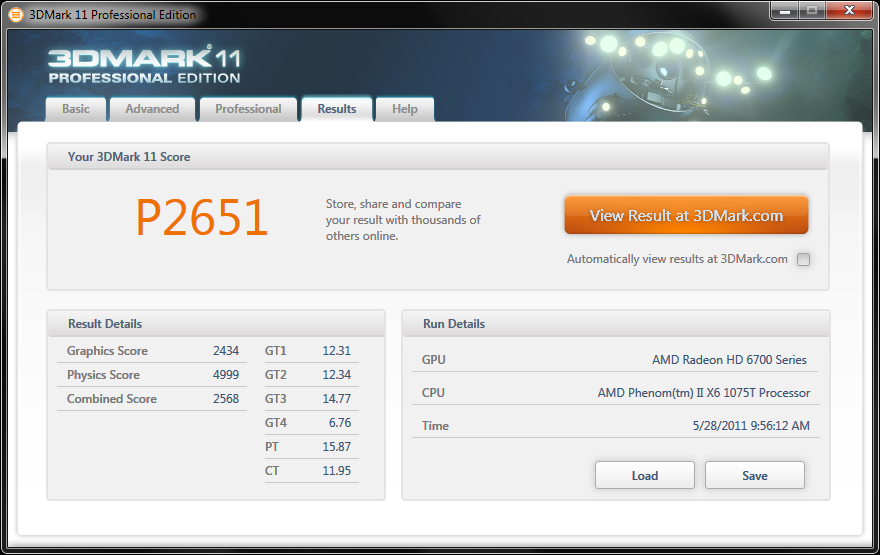
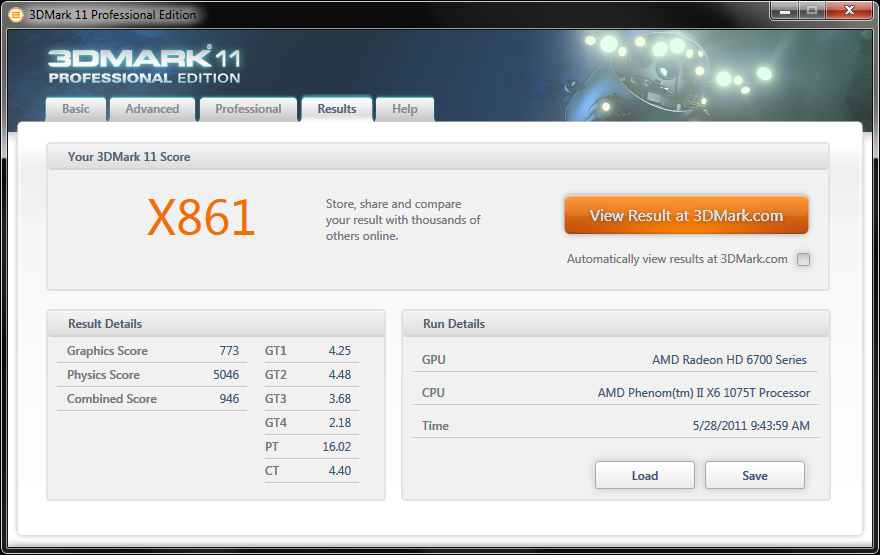
I ran PCMark 11 twice. One using the mid level performance test, and the other using the much higher level Extreme setting. The Sapphire card received a 22651 and an 861 respectively. Not at all bad for a mid level card.
–~~~~~~~~~~~~–
Furmark
“FurMark is a very intensive OpenGL benchmark that uses fur rendering algorithms to measure the performance of the graphics card. Fur rendering is especially adapted to overheat the GPU and that’s why FurMark is also a perfect stability and stress test tool (also called GPU burner) for the graphics card.”
Furmark is a great test if you want to punish your card. Take it’s warnings serious.
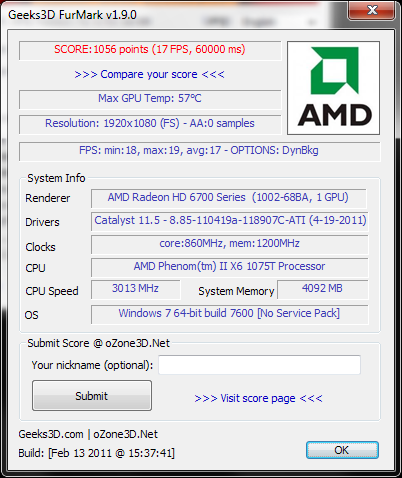
I ran this test using the 1080 preset and got a nice 17fps and 1056 points. Furmark does a really great job a creating a benchmark that is visually interesting while being very simple and obviously intense. I recommend downloading it just to witness the fuzzy donut. Compare these results to your own machine to see how much of an improvement you might receive if you chose this card.
Luxmark
“LuxMark is a OpenCL benchmark tool. The idea for the program was conceived in 2009 by Jromang. It was intended as a promotional tool for LuxRender (to quote original Jromang’s words: “LuxRender propaganda with OpenCL”). The idea was quite simple, wrap SLG inside an easy to use graphical user interface and use it as a benchmark for OpenCL. After Anandtech adoption of SLG as OpenCL benchmark, the code was finally written.”
Luxmark will help us see how well the Sapphire Radeon Vapor-X 6770 will do running OpenCL code. OpenCL is a bit more practical than your everyday benchmark. And when I say practical I mean boring. Just kidding. 😛
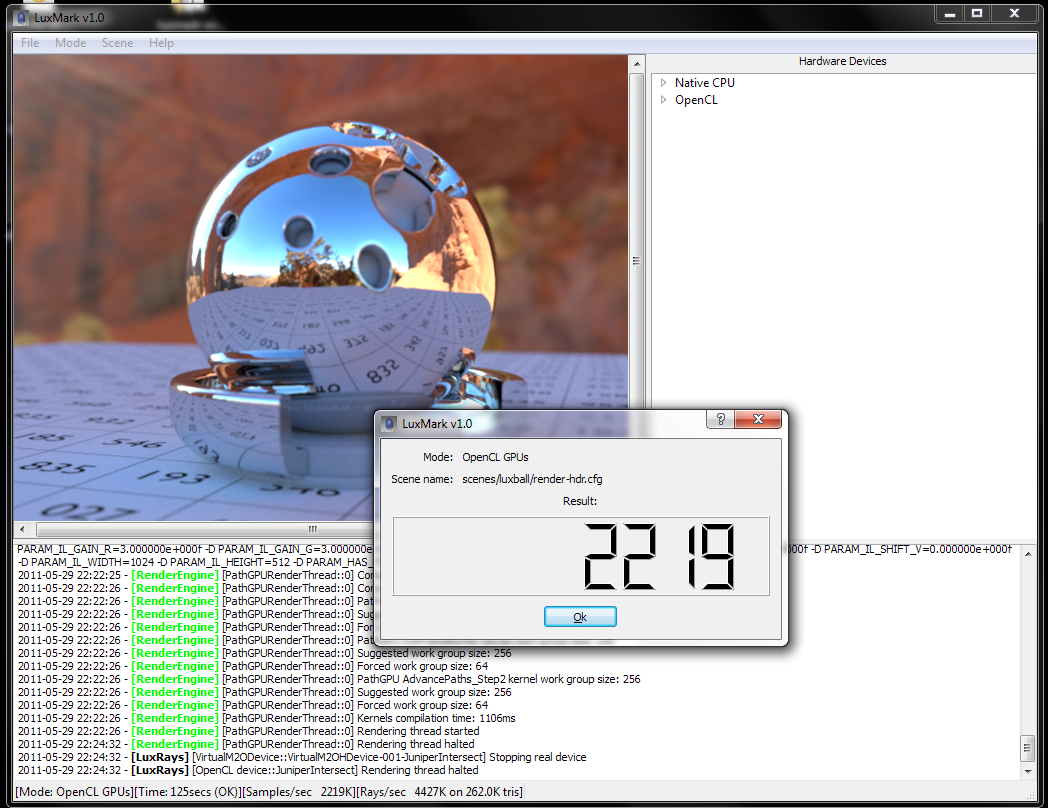
The Vapor-X scored a 2219. That means it’s good at OpenCL, but you could probably get a better card. That doesn’t mean this wont do fine. Run this test on your machine to compare.
Cinebench 11.5
CINEBENCH is a real-world cross platform test suite that evaluates your computer’s performance capabilities. CINEBENCH is based on MAXON’s award-winning animation software CINEMA 4D, which is used extensively by studios and production houses worldwide for 3D content creation. MAXON software has been used in blockbuster movies such as Spider-Man, Star Wars, The Chronicles of Narnia and many more.
CINEBENCH is the perfect tool to compare CPU and graphics performance across various systems and platforms (Windows and Mac OS X). And best of all: It’s completely free.
–~~~~~~~~~~~~–
Portal 2
Portal 2 was probably the most anticipated release of this year, apart from the upcoming Duke Nukem Forever (’bout damn time!). While it’s running Valves’ somewhat dated Source engine, it does have some stunning visuals and physics. For this test I used FRAPS, a simple frame counting program that runs in the background. I wanted to choose a demanding scene (no spoilers, though if you cared you probably beat it already) so I picked the beginning when Chell wakes up and the trailer she’s in is falling apart. For those of you who haven’t played, this scene is very physics intense and relatively demanding. I also measured the FPS in a random puzzle room with lasers.
Settings were set to max with Vertical Sync set to off at 1920×1200 resolution.
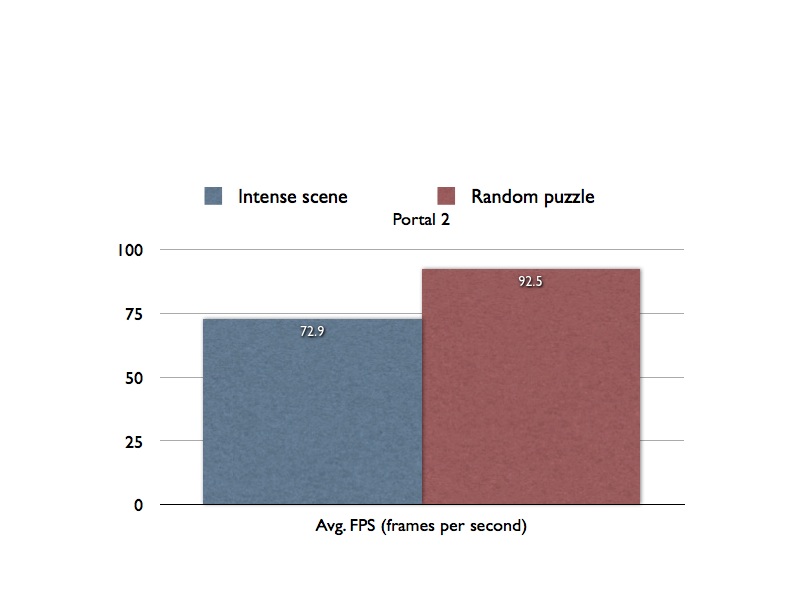
I wasn’t expecting this game to give a low score. With this card you are pretty much guaranteed at least 60fps. The engine is old, but rest assured, you shouldn’t have any problems running your source games on max settings.
Starcraft 2
Starcraft 2 doesn’t have a benchmarking tool, so I used FRAPS and a replay titled “One of the best zvp ever” that I downloaded from Gamereplays.org. I then went through and started the 60 second time when I saw both sides get at it, i.e. the most demanding parts of the game. This does allow for some serious variation so I ran a few tests.
Settings were set to ULTRA with V-Sync off and a resolution of 1920×1200.
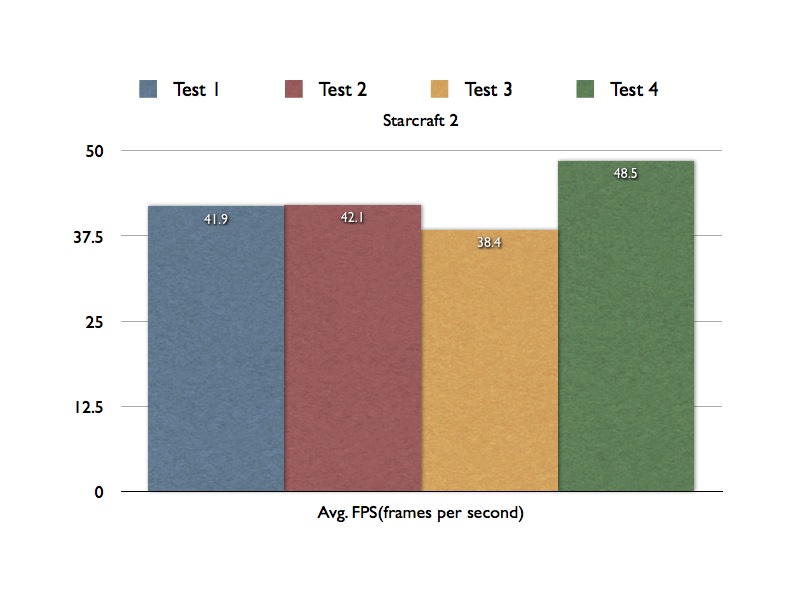
On Ultra I was able to get a great set of averages ranging from 38FPS to 48FPS. These were all during intense action scenes and will vary. These numbers are fine for single player though I’d imagine those serious about multiplayer aspect of the game like to to run at at least 60fps.
Dirt 3
Dirt 3 is one of the few games I’ve seen that has a built-in benchmarking tool. Dirt 3 is probably one of the most demanding games out there, and really looks beautiful at max settings.
Settings are at their maximum at 1920×1200.
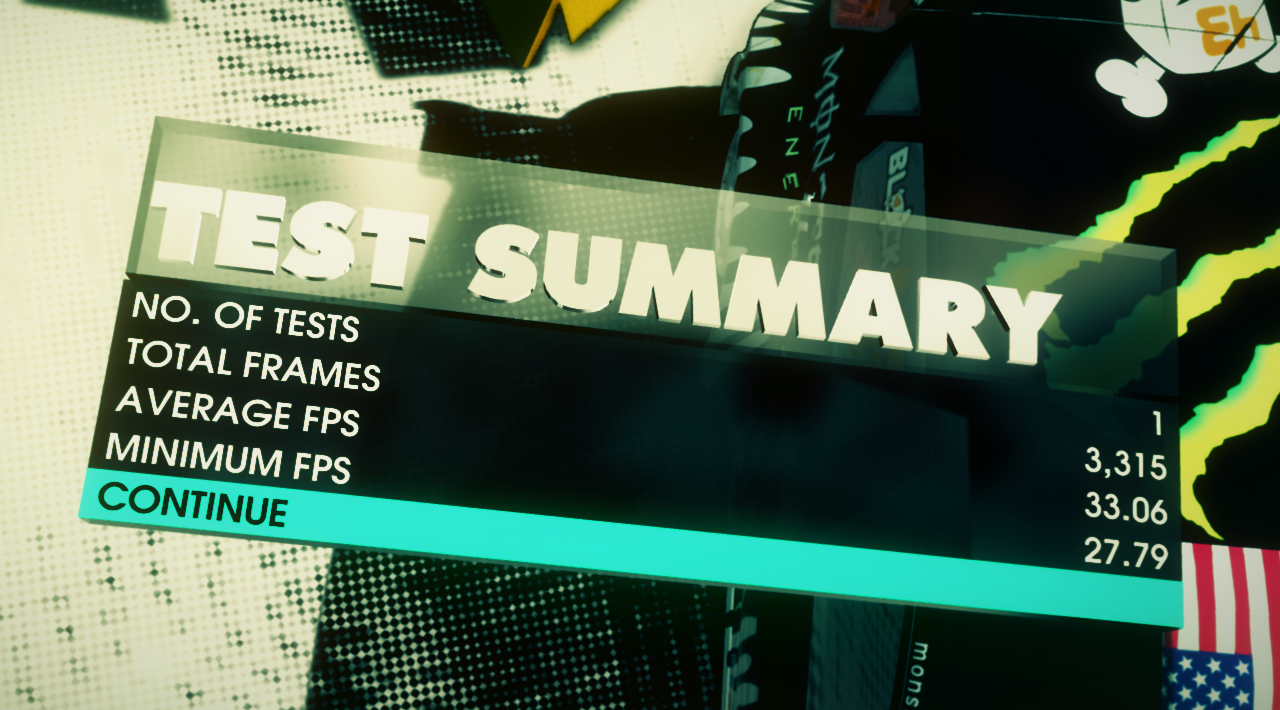
The Vapor-x scored 33fps on average which is perfectly playable single player. For multiplayer, you want to have a minimum of 30fps so decreasing some settings or even the resolution should help. 60fps is of course ideal for competitive play. This game is very demanding so I’m not to surprised with these results.
Battlefield: Bad Company 2
Battlefield: Bad Company 2 was released last year and was one of the first DirectX 11 titles. It’s also running the same engine (though a bit younger) as the upcoming and highly anticipated Battlefield 3. This game does not have a built in tool so I used FRAPS to capture various points during a multiplayer game.
Settings are High (max) with 4xAA with a 1920×1200 resolution.
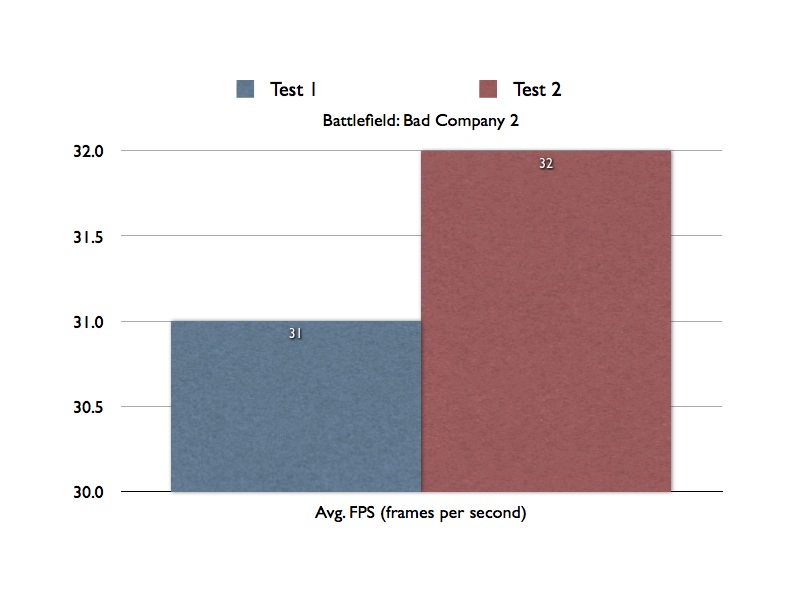
The results are in and we have a solid FPS of about 30. Not to bad. This game can be intense. I did try to make sure I got into combat during these runs.
Crysis 2
“Can it play Crysis?” YES! In fact, Crysis 2 is more of an improvement and optimization of the previous engine, so Crysis 2 actually runs great! I used Crysis’ benchmarking tool that you can activate by following these directions (Crysis 2 benchmark).
I ran this test with a few different settings. I ran two tests at 1920×1200 on ADVANCED and then the more extreme HARDCORE settings then two more at 1680×1050 to see the different between resolutions.

Good bit of a difference in FPS between Advanced and Hardcore, while adjusting the resolution didn’t help to much. I do want to note that I did have to look up which setting was the most advanced setting for this game because the naming convention they use sounds made up (because it is). GAMER is low, ADVANCED is middle, and HARDCORE is the best. I’ve seen games that put GAMER in the middle or even at the top. Why can’t they just use low, medium, and high?
Alien vs. Predator 2
I’ve actually never played this game, but it does have a standalone benchmarking tool and runs on DirectX 11. This test did not provide a nice output so I took a screen shot of the results. Excuse the Mac interface. I use a Mac to get my work done.
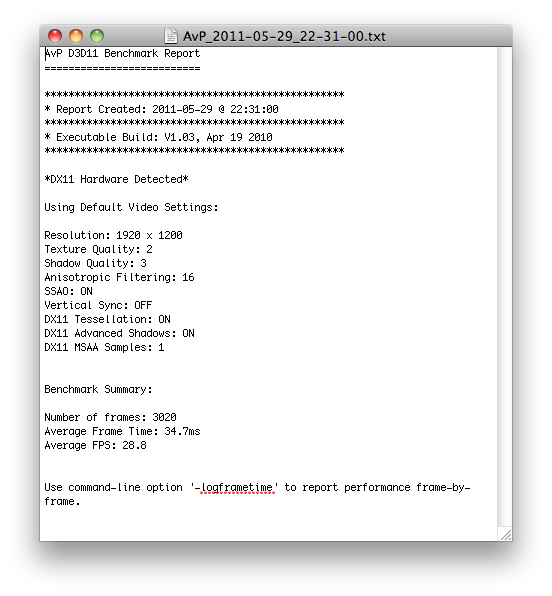
Here we have an average FPS of 28.8. Perfectly playable for a single player game, though you’ll be comfortable at 30FPS by lowering a few settings.
Overclocking
*make sure you turn off AMD Cool ‘n’ Quiet before attempting any sort of overclock*
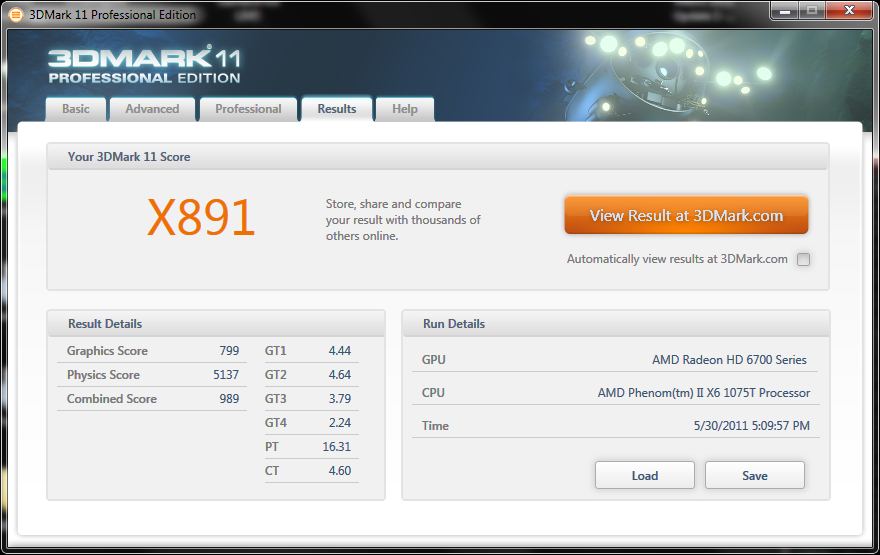
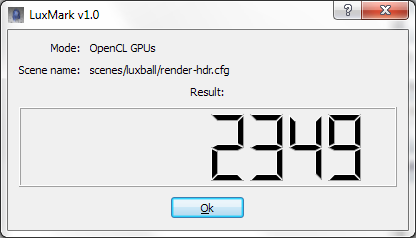
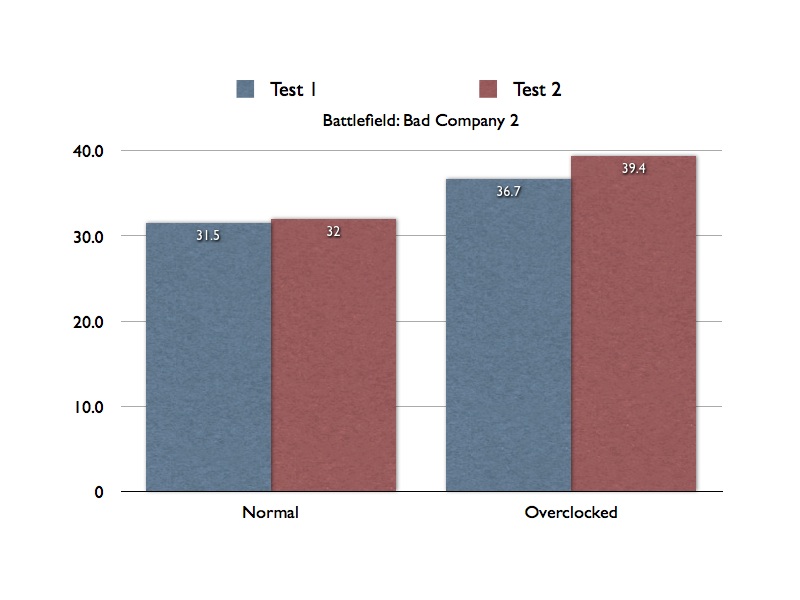
AMD provides a great tool for overclocking your graphics card and it’s part of the Catalyst Control Center that you get with your drivers. I didn’t spend a lot of time overclocking this card, but I did test to see how it did maxed out. AMD lets me overclock it to a whopping 960MHz core bus and up to 1425MHz. After doing this my machine became very unstable. I was able to find a decent stable over clock at 900MHz (Core )and 1303 MHz (memory), though I think with better cooling you could get it higher (or even just messing with each part individually). Like I said, I did not spend a lot of time trying to find the best overclock I could get. I brought it to the max for funsies, and then found a good, stable overclock. Here are the results:
 |
 |
| 3DMark 11 Performance | 3DMark 11 EXTREME |
 |
 |
| Luxmark | Battlefield: Bad Company 2 |
Not much of an improvement in the synthetic benchmarks, but a nice 15% improvement where it counts: gaming. This is most likely due to the RAM overclock since games are swapping so much data around. The synthetic scores only got about a 2-5% increase in performance with a 5% overclock.

Conclusion
Overall, the Sapphire Vapor-X Radeon 6770 1GB GDDR5 is a very fast card, especially for it’s price. If you are looking to upgrade your card from a 4000 series ATI or a lower Nvidia card you are in for a treat. I went from an Nvidia GTS450 to this and there was a noticeable improvement. If you are thinking about upgrading coming from a 5700 series card or something like an Nvidia 460, you might want to save your money, or go for a 6800 series card or a something similar from Nvidia. This is a mid-range card. Borderline budget card too for the price, but for the performance you’d think different. Overall this proved to be a great card, and I would definitely recommend for anyone looking for a cheap upgrade.